ChronoEdit
Master NVIDIA's ChronoEdit model. Learn how to use temporal reasoning for physically consistent image edits, from camera moves to object manipulation.
What is ChronoEdit
ChronoEdit is a specialized generative AI framework developed by NVIDIA and the University of Toronto. It introduces a novel "hybrid" approach to image editing by treating the process as a video generation task. Rather than simply overlaying new pixels, ChronoEdit understands the causal order of events.
For example, if you ask the model to "add a cat sitting on a bench," it logically generates the bench first and then places the cat upon it, mimicking real-world cause and effect. This "temporal reasoning" allows the model to preserve physical details—such as textures, wrinkles, and lighting—making it a powerful tool for simulations where adherence to the laws of physics is more important than mere aesthetic style.
Model Specifications
| Feature | Specification |
|---|---|
| Developer | NVIDIA & University of Toronto |
| License | Commercial Use Allowed |
| Speed | Slow to Moderate (High Compute Requirement) |
| Input Support | Single Image Only |
| 3D Awareness | High (Structure & Texture Preservation) |
| Best For | Physics simulation, robotics data, object rotation |
Key Features
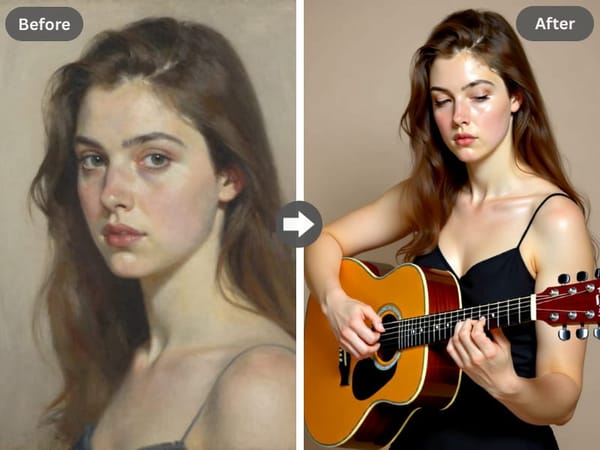
Causal Reasoning and Logic
Unlike traditional editors that blend images, ChronoEdit understands the logical sequence of an edit. It ensures that added objects interact naturally with the environment.
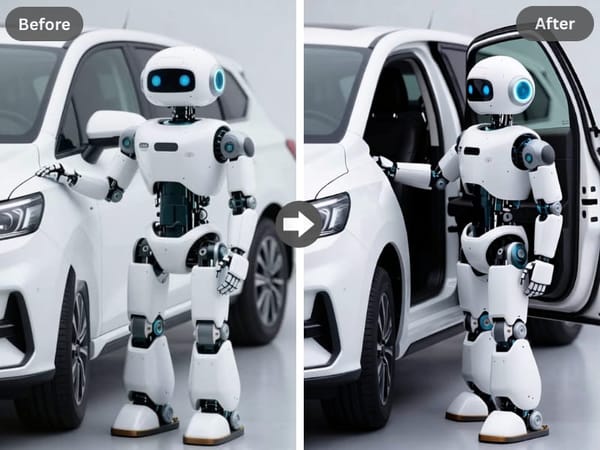
This capability allows for complex interactions, such as a robot arm grasping an object or a vehicle braking, where the model understands the physical implications of the action.
3D Spatial Understanding
The model possesses a strong grasp of 3D structure. When rotating an object—for instance, turning a knight to face the camera—ChronoEdit correctly re-renders surface details like logos or armor patterns from the new angle. It maintains the volume and geometry of objects rather than flattening them.
Advanced Prompting Tricks and Templates
Causal Ordering
Since the model thinks in timelines, structure your prompt to reflect the order of operations.
Template: "First [Background/Context], then [Action/Object Interaction]."
Example: "A park bench in sunlight. A cat jumps onto the bench and sits down."
Specific Pose Orientation
To achieve complex rotations, be explicit about the target angle.
Template: "Turn the [Subject] to face [Direction]. Ensure [Detail] is visible."
Example: "Turn the anime character to face the camera front-on. Ensure the logo on the shirt is correctly distorted by the fabric folds."
Multi-Modal Sketch Input
ChronoEdit allows for "Sketch-to-Image" workflows. You can upload a simple pencil sketch and use a prompt to convert it into a detailed style, such as a "Japanese black-and-white anime scene," while strictly adhering to the sketch's layout.
Use Cases
Autonomous Driving and Robotics Simulation
ChronoEdit is uniquely capable of simulating "danger scenarios" that are difficult to capture in real life, such as car crashes or emergency braking. Its adherence to physics makes it a valuable tool for generating synthetic training data for autonomous systems.
Precise Functional Edits
The model excels at surgical changes. It can remove specific items (like glasses from a face) without distorting the facial features, or add objects (like a red coat) that cast accurate shadows on the ground, respecting the scene's environmental lighting.
Concept Art and Style Transfer
Designers can use ChronoEdit to transform the material of an object—for example, turning a photo of a cat into a "PVC scale figure." While the model leans towards realism, it can adopt specific artistic styles (like Gongbi painting) while keeping the subject consistent.
Why Choose Somake
Zero Hardware Setup
Running a video-prior model locally is complex and slow on consumer cards. Somake provides an instant, optimized environment, handling the heavy lifting so you can focus on crafting the perfect prompt.
Stable Inference Environment
We have tuned the inference parameters to minimize "hit or miss" results. By optimizing the token limits and step counts on our backend, Somake offers a more reliable experience for this experimental technology.
All-in-One Creative Suite
Gain immediate access to an extensive arsenal of digital tools, allowing you to generate professional-grade images, dynamic videos, and compelling text content—all centralized within one intuitive and unified dashboard.