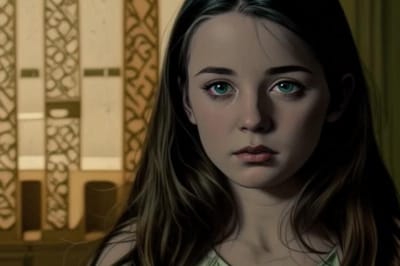
Vidéo Style Van Gogh
Envie d'une touche artistique ? Transformez vos vidéos en chefs-d'œuvre de peinture à l'huile. Découvrez les fonctionnalités, étapes et FAQ dans notre guide.
Convertissez vos vidéos en style Van Gogh avec Somake
Cet outil applique les techniques artistiques de Vincent van Gogh à vos propres vidéos. Il utilise le transfert de style neuronal pour reproduire les coups de pinceau, les palettes de couleurs et les textures emblématiques des célèbres peintures postimpressionnistes.
Le processus est entièrement automatisé et ne nécessite aucune compétence en montage ou en art. Vous pouvez générer un rendu stylisé en quelques minutes, idéal pour vos projets créatifs ou pour le partager sur les réseaux sociaux.
Générez votre œuvre
Suivez ces étapes pour transformer votre fichier :
Téléchargez votre vidéo : Glissez-déposez votre fichier MP4 ou MOV dans la zone de téléchargement.
Lancez le traitement : Cliquez sur le bouton "Générer". L'IA analyse vos images et calcule la nouvelle version.
Téléchargez et enregistrez : Visualisez l'aperçu du résultat. Si cela vous convient, téléchargez le fichier en haute résolution sur votre appareil.
Fonctionnalités clés de l'effet Vidéo Style Van Gogh
Transfert de style haute fidélité
Applique avec précision des textures complexes, comme les volutes de peinture à l'huile, sur des objets en mouvement sans aucun scintillement.
Compatibilité multi-formats
Prend en charge les formats vidéo standards, notamment le MP4, le MOV et l'AVI, pour une compatibilité maximale.
Cas d'utilisation courants
Contenu pour les réseaux sociaux
Les créateurs utilisent cet outil pour produire des clips originaux sur TikTok ou Instagram Reels. Cette esthétique unique permet à vos contenus de se démarquer dans les fils d'actualité.
Projets d'art numérique
Les artistes et étudiants appliquent ces filtres à leurs séquences pour créer des toiles numériques animées. C'est une base parfaite pour des installations multimédias.
Supports marketing
Les marques exploitent le transfert de style pour créer des arrière-plans visuels attrayants pour des présentations ou des publicités. Cela apporte une touche artistique et sophistiquée aux vidéos de stock classiques.
Pourquoi choisir Somake
Interface intuitive
Le tableau de bord est simple à utiliser et ne nécessite aucune connaissance technique. Vous passez de l'importation au téléchargement en seulement quelques clics.
Gestion sécurisée des données
Votre sécurité numérique est notre priorité. Vos fichiers ne sont jamais utilisés pour entraîner nos modèles publics sans votre autorisation explicite.
Qualité constante
L'IA maintient une cohérence temporelle entre les images. Cela évite l'effet de "tremblement" souvent observé avec les outils de transfert de style de moindre qualité.