ズートピア風フィルター
自撮り写真をズートピア風のキャラクターに変身!ニックやジュディと一緒に写ったり、オリジナルのケモノ風アートを作成したり。SomakeのAIフォトエディターを今すぐ体験しましょう!
あなたの写真をアニメ映画『ズートピア』の世界観へ
もし自分がズートピアの住人だったらどんな姿になるか、想像したことはありませんか?Somakeの高度なフォトエフェクトシリーズの一つである「ズートピア風フィルター」は、あなたの写真をあの人気アニメ映画特有の、ふかふかした立体的な3Dデザインに作り変える専用のAIツールです。
ジュディ・ホップスと一緒に自撮りしたり、オリジナルの擬人化アバター(ファーソナ)を作成したり、「ニック・ワイルド」スタイルのぬいぐるみフードを被った姿を見てみたり。当社の生成エンジンなら、わずか数秒で実現します。
ズートピア風フィルターの使い方
アップロード: 入力エリアに写真をドラッグ&ドロップします(明るい場所で撮った写真がベストです)。
スタイル選択: 全身変身する「ZOOT ME!」や「ジュディ&ニックと自撮り」などのプリセットをクリックします。
生成: ボタンを押してレンダリングを開始。微調整したい場合は「カスタムスタイル」ボックスに、小物や背景の指示を入力してください。
スタイル紹介
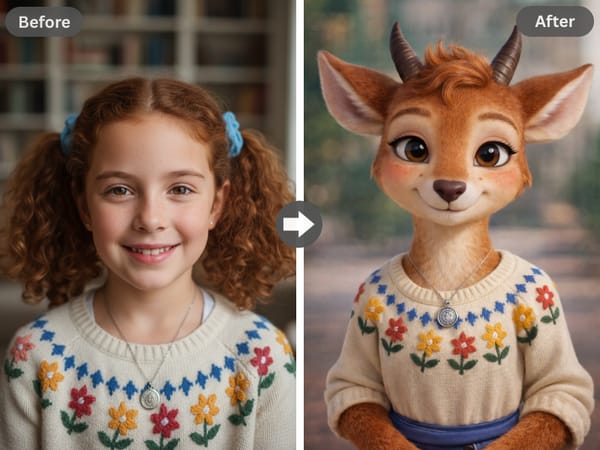
1. 「ZOOT ME!」変身モード
一番人気のパワフルな機能です。単にフィルターをかけるだけでなく、あなたの個性を3Dキャラクターとして再構築します。
技術: ピクサー風3Dフィルターと同様のスタイル転送ロジックを採用しています。
仕上がり: 目元や表情の特徴はそのままに、柔らかな毛並みの質感と映画クオリティのライティングを適用します。
おすすめ: オリジナルのケモノアバター(ファーソナ)や、SNSのアイコン作成に最適です。
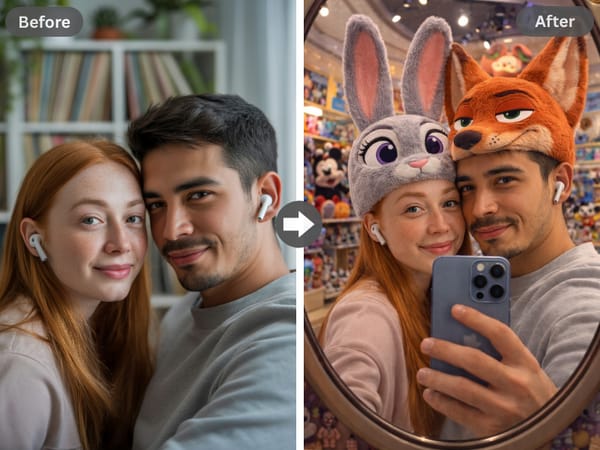
2. ズートピア・ぬいぐるみフード
家から一歩も出ずに「ディズニーパーク」にいるような気分を味わえます。このスタイルでは、超リアルでふわふわなキャラクターの帽子を写真に合成します。
ルック: 友人との写真も一瞬で、3Dレンダリングされたニックやジュディのぬいぐるみ帽子を被った姿になります。
雰囲気: 背景もカラフルなショップやトイストアのように自動で調整されます。
おすすめ: カップルや親友との自撮り、素顔を活かした可愛いプロフィール写真にぴったりです。
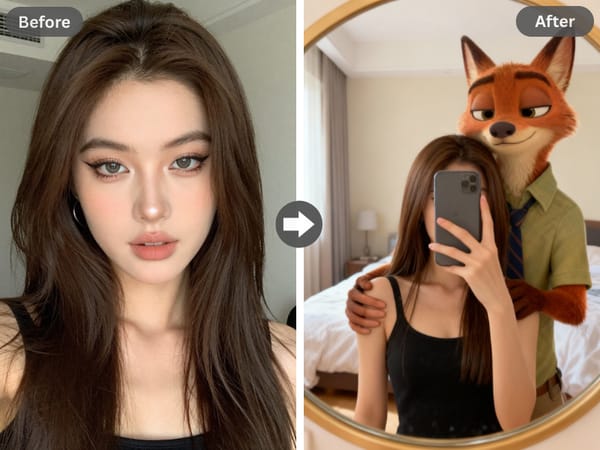
3. 「ニックに抱っこ」エフェクト
多くのリクエストにお応えして、ニック・ワイルドファンのための専用モデルを追加しました!
ポーズ: ニックがあなたを抱きしめている、あるいは支えてくれているようなシーンを生成します。
ファン必見: 推しとのカップリング画像やファンフィクションの表紙、遊び心のあるSNS投稿に最適です。
上級編:カスタムプロンプト(指示文)
さらにこだわりたい方は、「カスタムスタイル」のテキスト入力欄を使って、映画の特定の世界観を指定してみましょう。
試してほしいズートピア風プロンプト:
ZPD警察官: 「青い警察の制服、サバンナ・セントラルに立っている、警察バッジ、晴れた日」
ツンドラ・タウン風: 「冬のコートとスカーフ、赤いアイス(パウシクル)を持っている、雪の背景」
ポップスター気分: 「ガゼルとステージ上、キラキラした衣装、コンサートの照明、マイク」
プロのヒント: アニメスタイルがお好きな方は、次にジブリ風写真変換ツールを試してみてください。2Dの手書き風スタイルを楽しめます。
スタイル紹介
💡 よくある活用シーン
SNSでバズるコンテンツ: Discord、TikTok、X(Twitter)用の「ズートピア化した」アイコン画像を作成。
ファンアート制作: YouTubeのサムネイルや小説の表紙用に、絵を描く手間なく素材を生成。
デジタルメッセージ: ディズニーファンの友達の誕生日に、パーソナライズされた「ジュディとの自撮り」を送ってサプライズ。
ペットを変身: ペットの写真でもOK!愛犬や愛猫をアップロードして、映画に出てくるような喋る動物キャラクターに変身させましょう。
Somake AIが選ばれる理由
プライバシー重視
写真は安全に処理されます。明示的な同意なしに、アップロードされた写真が公開モデルの学習に使用されることはありません。
深い生成クオリティ
単なるフィルター貼り付けではなく、3D空間で画像を再構成し、映画レベルの照明と質感を再現します。
ブラウザで完結
重いアプリのダウンロードは不要。Chrome、Safari、スマホのブラウザで完璧に動作します。
よくある質問 (FAQ)
免責事項: 本AIツールは、個人が楽しむことを目的として開発された独立したファン制作物です。ウォルト・ディズニー・カンパニー、ピクサー・アニメーション・スタジオ、およびそれらの子会社や提携会社とは、提携、関連、承認、または公式な関係は一切ありません。「ディズニー」「ピクサー」「ズートピア」および関連する名称、商標、エンブレム、画像は、それぞれの所有者の登録商標です。