Christmas Filter
Transform your pictures with Somake's Christmas photo editor. Add festive backgrounds, lights, and Santa hats online for free. Perfect for holiday cards!
Transform Your Pictures into Festive Memories
The holiday season brings joy, but creating the perfect holiday image often brings stress. Whether you are struggling with dull lighting or lack the design skills to add festive flair, manual editing takes time you don't have.
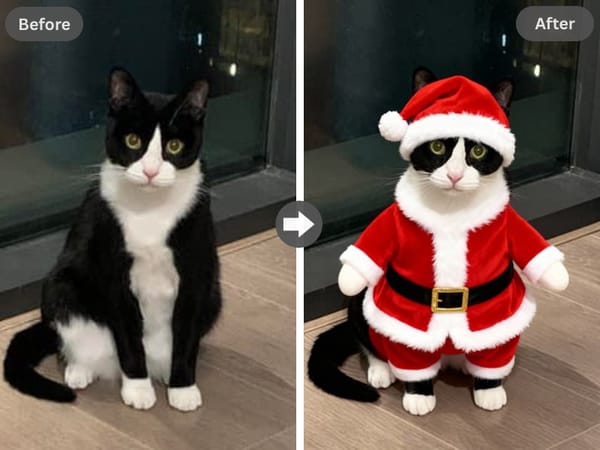
The Somake Christmas Filter is your instant solution. Acting as a powerful christmas photo generator, this tool automatically enhances your pictures with holiday magic. From adding a Santa hat to a warm winter glow, it turns ordinary snapshots into professional-grade holiday greetings in seconds.
How It Works
Upload: Drag and drop your image into the Somake interface.
Style Selection: Choose from various presets such as "Santa Snapshot," "Everything Christmas Tree," or "Christmas Elf." This dictates the overall mood and color palette.
Download: Save your festive image in high resolution.
Enhance Your Holiday Creation
Once you have applied the Christmas Filter, consider these tools to perfect your project:
Background Remover: If the Christmas filter didn't catch a complex background, use this first to isolate your subject cleanly before applying festive backdrops.
Image Upscaler: Perfect for printing physical greeting cards. Upscale your filtered image to 4K resolution without losing quality.
Use Cases
Creating Digital Greeting Cards
Save money on postage and printing by creating digital e-cards. Use the tool to add Merry Christmas to photo designs with elegant typography. You can personalize the message for family and friends, creating a heartwarming, custom visual that is far more meaningful than a generic store-bought card.
Fun Profile Pictures
Update your digital presence for the season. Quickly generate a festive avatar by adding a realistic Santa hat to your current profile picture. It is a fun, low-effort way to show holiday spirit across Slack, LinkedIn, or social media profiles without needing a professional photoshoot.
Engaging Social Media Content
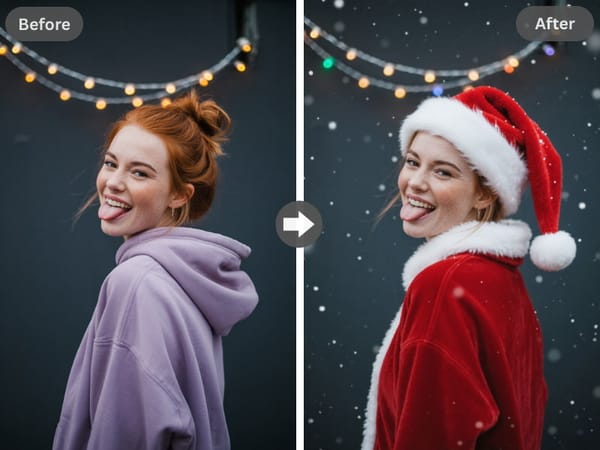
influencers and brands can use the christmas photo editor to keep their feed relevant during December. Transform standard product photos by adding subtle christmas lights or a snowy overlay. This increases engagement rates on platforms like Ins and TikTok by aligning your content with current seasonal trends.
Why Choose Somake
Instant AI Precision
The AI automates hours of Photoshop work, accurately placing elements like hats and lights without manual tracing.
Cost-Effective Creativity
We allow you to add christmas background to photo online free, making high-end photo editing accessible to everyone.
User-Friendly Interface
The intuitive layout ensures that anyone, from beginners to pros, can transform pictures with just a few clicks.