Ideogram
Ideogram V4 generates logos, posters, and ad creatives with accurate text and 2K resolution. Compare with 15+ models on Somake AI.
Ideogram AI Generator
Current Version: V4 · Last Updated: June 2026 Legacy versions available via the left-hand panel.
Quick Overview
| Attribute | Details |
|---|---|
| Model Version | Ideogram 4.0 |
| Developer | Ideogram, Inc. |
| Release Date | June 3, 2026 |
| Model Type | Text-to-Image Generation |
| Core Strengths | Multilingual text rendering, bounding-box layout control, native 2K resolution, transparent backgrounds |
| Best For | Logos, posters, ad creatives, product mockups, design-heavy compositions |
| Available On Somake | Yes |
Introduction
Ideogram is a text-to-image model developed by Ideogram, Inc., best known for being one of the most reliable tools at rendering accurate, readable text within generated images. As of V4, it's also the company's first open-weight release — meaning businesses and researchers can download the model, fine-tune it on their own data, and run it on their own servers.
V4 is built from scratch, not an update to V3. The most notable technical change is a new text processing system that uses a full vision-language model instead of simpler text encoders. In practice, this means better understanding of complex descriptions and more accurate rendering of text across languages, including non-Latin scripts. V4 also adds native 2K resolution output, transparent background generation, and a way to specify exactly where elements should appear in the image.
This model is a strong fit for designers, marketing teams, and anyone creating text-heavy graphics like logos, posters, or ad creatives. It's less suited to freeform creative work where you want the model to interpret loosely-worded prompts freely.
What's New in V4
Open weights with a commercial license — first version you can download, fine-tune, and deploy on your own servers
Native 2K resolution — generates up to 2048×2048, with flexible aspect ratios up to 6:1
Transparent backgrounds — output assets ready for compositing, no manual cutout needed
Layout control via bounding boxes — tell the model where to place text or objects using coordinate inputs
Optional JSON prompting — for users who want precise, repeatable layouts; natural language still works fine
Multilingual text rendering — as of V4, readable in-image text now works for non-Latin scripts too
Upgraded text understanding — uses a vision-language model (Qwen3-VL-8B) instead of a simpler text encoder, giving better comprehension of complex prompts
The jump from V3 to V4 is meaningful for professional use. Transparent backgrounds and layout control are genuinely new capabilities. For casual creative use, V3 and V4 produce similar quality — the new features matter most when you need precise, production-ready output.
Core Features
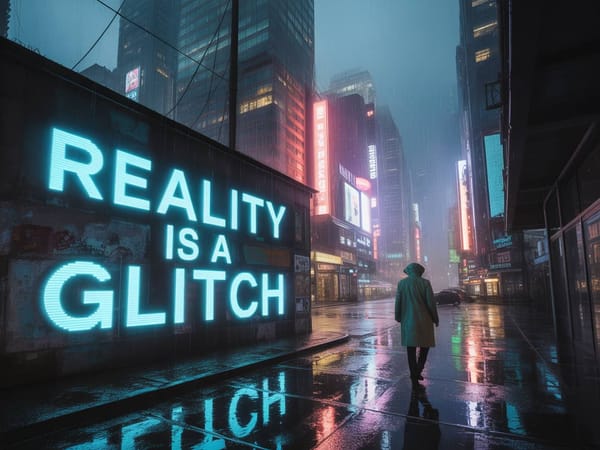
Accurate In-Image Text Rendering
Ideogram renders readable, well-formed text inside images — logos, headlines, signage, labels. As of V4, this works across languages including non-Latin scripts. For any project where text needs to actually look right inside the image, this is one of the most reliable options available.
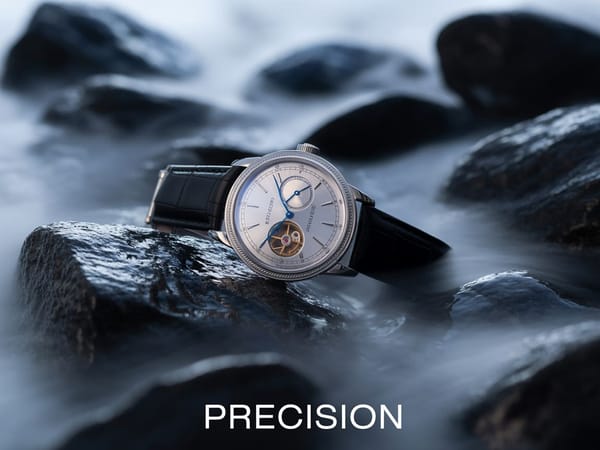
Layout Control
You can tell V4 where to place specific elements — a headline at the top, a product in the center, a label at the bottom — using coordinate inputs. This is useful when you need consistent placement across multiple images, like a set of ad creatives or product cards.
Native 2K Output
V4 generates at up to 2048×2048 natively, with no upscaling step needed. Textures, lighting, and fine detail hold well at full resolution, making outputs usable for print and high-resolution display directly.
Transparent Backgrounds
As of V4, you can generate images with transparent backgrounds. Product shots, icons, and graphic elements come out ready to drop into other designs without manual cutting.
Natural Language and JSON Prompting
V4 responds well to regular text prompts — describe what you want in plain language and it works. For users who need tighter control over layout and colors, there's also an optional JSON format where you can specify exact positions, hex color palettes, and per-element descriptions. You don't need to use JSON to get good results.
Prompt Guide
V4 works well with natural language prompts — you don't need to learn any special format to get good results. That said, a few habits make a noticeable difference.
Writing Effective Natural Language Prompts
Be specific about what you want to see: lighting, surface, mood, and composition. "product photo of a glass perfume bottle, soft studio lighting, white background, shallow depth of field" produces more consistent results than "product photo". Design vocabulary terms (editorial, minimalist, matte, high-contrast) work well. Vague mood words like "beautiful" or "amazing" add little.
For text in images, spell out exactly what you want: "a poster with the headline 'Summer Sale' in bold sans-serif at the top". The more specific you are about placement and style, the better.
Using the JSON Format (Optional — for Advanced Control)
If you need precise, repeatable layouts — like placing a headline at an exact position or matching a brand's hex colors — V4 supports a structured JSON prompt format. Here's a simple example:
json
{
  "style_description": "Minimalist product poster, clean white background, soft shadow",
  "elements": [
    {
      "description": "A glass bottle of perfume, amber liquid, gold cap",
      "bounding_box": [0.3, 0.1, 0.7, 0.75]
    },
    {
      "text": "LUMIÈRE",
      "font_style": "serif, light weight",
      "bounding_box": [0.25, 0.8, 0.75, 0.92]
    }
  ],
  "color_palette": ["#F5F0E8", "#C9A96E", "#2C2C2C"]
}
Bounding box coordinates are [x_min, y_min, x_max, y_max] as a fraction of the image size (0 to 1). Keep element regions from overlapping for cleaner results.
Choosing the Right Speed Mode
Turbo is great for exploring ideas quickly. Switch to Balanced or Quality once you have a direction you like — they run more generation steps and produce noticeably sharper detail, especially for text and fine textures.
Version History
| Version | Release Date | Key Changes |
|---|---|---|
| Ideogram 4.0 | June 3, 2026 | Open-weight release; native 2K resolution; transparent background support; bounding-box layout control; JSON prompting interface; multilingual text rendering; VLM text encoder (Qwen3-VL-8B) |
| Ideogram 3.0 | March 26, 2025 | Improved photorealism; Turbo/Balanced/Quality speed tiers; negative prompt support; refined text rendering over V2 |
| Ideogram 2.0 | August 2024 | Style modes (realistic, design, 3D, anime); improved text generation |
| Ideogram 2a | February 2025 | Faster inference; optimized for design tasks |
| Ideogram 1.0 | 2024 | First major release; established text-rendering differentiator |