Somake
Toggle sidebar
Upgrade

Nose Piercing Filter

Try our virtual nose piercing simulator to see what you'd look like with a nose piercing instantly.

Examples
Example Result 1
Example Result 2
Example Result 3
Example Result 4
Example Result 5
Effects
Select Photo Effects
Fat Filter

Fat Filter

Soyjak

Soyjak

Crochet

Crochet

Makeup Filter

Makeup Filter

Pregnant Filter

Pregnant Filter

Add Braces

Add Braces

Lego

Lego

PS2

PS2

Couple Snow Globe

Couple Snow Globe

Fisheye Filter

Fisheye Filter

Age Filter

Age Filter

Pixar 3D

Pixar 3D

Skinny Filter

Skinny Filter

2D to 3D

2D to 3D

3D Figure

3D Figure

Action Figure

Action Figure

RPG Character Card

RPG Character Card

Pixel

Pixel

Barbie

Barbie

Clay

Clay

Photo to Sticker

Photo to Sticker

Comic Book

Comic Book

Line Drawing

Line Drawing

Sketch

Sketch

Muppet

Muppet

Emoji

Emoji

Cute 3D Filter

Cute 3D Filter

Polaroid 3D

Polaroid 3D

Low-Poly 3D

Low-Poly 3D

Simpsons Filter

Simpsons Filter

Chibi Filter

Chibi Filter

Photo to Cartoon

Photo to Cartoon

Caricature

Caricature

Disney

Disney

Snoopy

Snoopy

Cyberpunk

Cyberpunk

Steampunk Mechanical

Steampunk Mechanical

Surreal

Surreal

Stained Glass

Stained Glass

Pop Art

Pop Art

Painting

Painting

Ghibli

Ghibli

Animal Crossing

Animal Crossing

Moe Manga

Moe Manga

Irasutoya

Irasutoya

Photo to Anime

Photo to Anime

Smile Filter

Smile Filter

Cry Filter

Cry Filter

Remove Double Chin

Remove Double Chin

Nose Piercing

Nose Piercing

Add Beard

Add Beard

No Beard

No Beard

Remove Blemish

Remove Blemish

Braids

Braids

Bangs

Bangs

Buzz Cut

Buzz Cut

Blonde Hair

Blonde Hair

Bald

Bald

Add Wings

Add Wings

Add Glasses

Add Glasses

Halloween

Halloween

Bratz Doll

Bratz Doll

Vintage

Vintage

JoJo

JoJo

Illustration

Illustration

GTA

GTA

Eyebrow Filter

Eyebrow Filter

Fortnite Skin

Fortnite Skin

Change Eye Color

Change Eye Color

Change Skin Color

Change Skin Color

No found

Try adjusting your search terms

Input Image
Aspect Ratio
Auto
1:1
2:3
3:4
4:5
9:16
3:2
4:3
5:4
16:9
21:9
Private Mode

After enabling this feature, every image or video you generate will not be automatically shared to the community feed

No history found

Try on a New Look, No Needles Required

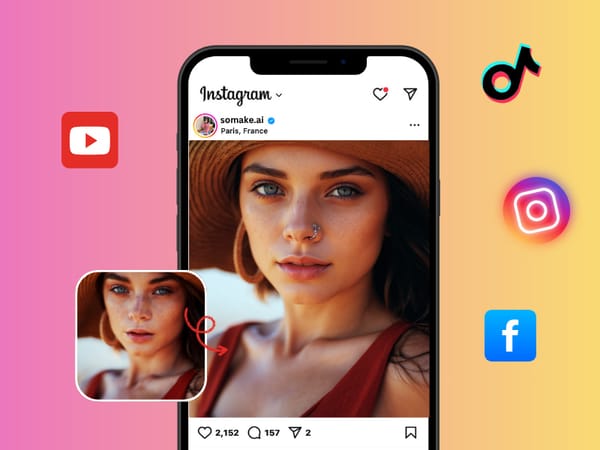
Ever wondered how you'd look with a nose piercing? Our AI Nose Piercing Filter lets you see for yourself in an instant. Just upload a selfie, and our tool automatically adds a stylish and realistic-looking nose stud to your photo, letting you try out the style commitment-free.
Feature image

Smart Placement for a Realistic Look

Our AI does more than just place a dot on your photo. It uses advanced facial recognition to accurately identify the unique contours of your nose. The technology then determines the most natural-looking placement for a nostril piercing, ensuring the virtual stud fits your specific facial structure. It intelligently adjusts for the angle and lighting of your photo for a truly believable effect.
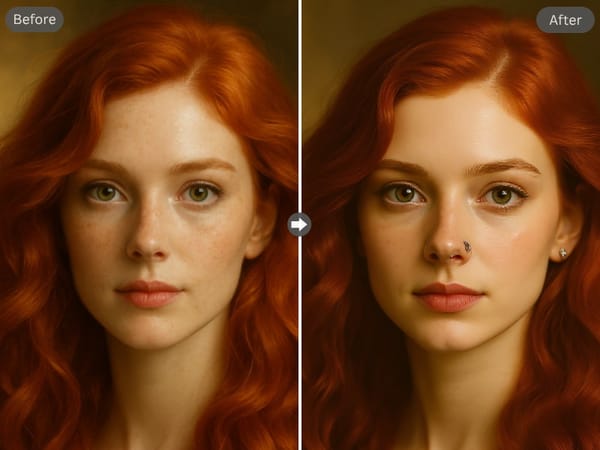
Feature image

A One-Second Style Makeover

Forget complicated photo editors or apps with confusing controls. Our tool is built for speed and simplicity. The entire process is automated: you upload your picture, and our AI handles the rest. There are no menus, no adjustments, and no manual positioning needed. Your new, pierced look is ready to be saved and shared in just a few seconds.
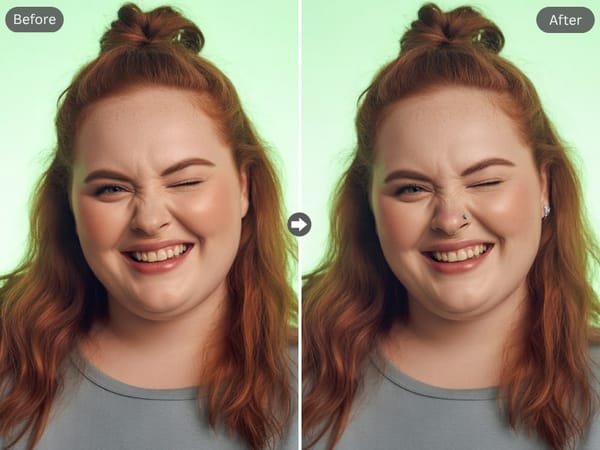
Feature image

What to Expect From Your Virtual Piercing

The AI is designed to generate a classic, elegant nose stud. It appears as a subtle, metallic or jewel-like stud on the side of the nostril. For the clearest results, use a well-lit, forward-facing portrait or selfie. The filter is sophisticated enough to look good from various angles, but a direct view of the face works best.

Why Choose Our AI Nose Piercing Filter?

1

Zero Commitment, All Fun: See if a nose piercing is right for you without any pain, cost, or permanence.

2

Hyper-Realistic Results: Our AI analyzes your unique facial features to place the piercing where it would naturally sit.

3

Instant and Automatic: Get your transformed photo in seconds with a fully automated, one-click process.

FAQ

The AI automatically selects a side for placement. You can flip the image in any basic editor if you'd like to see it on the other side.

Yes, the AI is generally able to work around glasses, as long as the side of the nose is visible.

It's incredibly fast! Your transformed photo is usually ready in less than 30 seconds.

We value your feedback and are here to assist you! If you have suggestions, encounter issues, or need help, feel free to reach out through the following channels:

Somake
Forgot Password Create an account Welcome to Somake
Enter your email to receive password reset instructions Enter your email address to create an account. Sign in with Google to claim your credits and start creating for free!
OR
Remember me
Remember your password?
By logging in, you agree to our Terms of Service and Privacy Policy .