Most StarryAI reviews still tell you the same thing: generate up to 5 images free every day, no watermarks, no credit card required.
That was the old version.
StarryAI no longer has a free tier. Plans start at $12/month with no way to test before you pay — and nearly every review out there hasn't caught up to this change. The most important question (is it worth subscribing?) is still being answered with outdated information.
This review uses current official pricing verified against live product screenshots, alongside output testing and real user feedback from Google Play, the App Store, and third-party review sites.
What It Is
StarryAI launched in 2021, founded by Mo Kahn. The pitch is simple: type what you want, pick a style, get art. No design background required.
The platform runs two core AI models. Altair uses VQGAN-CLIP and leans toward abstract, dreamlike, and deconstructed imagery. Orion uses CLIP-guided diffusion and produces more detailed, realistic-leaning outputs. Both accept text prompts and can be guided with uploaded reference images.
There are over 1,000 style presets — cyberpunk, watercolor, anime, oil painting, fantasy, and a lot more. The platform works on iOS, Android, and web, with creations syncing across devices.
Pricing
This is the most important section. Read it before you sign up.
Plans
StarryAI offers three subscription tiers. Annual billing saves 20% — effectively two months free.
| Plan | Monthly | Annual |
|---|---|---|
| Starter | $15/mo | $12/mo ($144/yr) |
| Unlimited Pro | $35/mo | $28/mo ($336/yr) |
| Unlimited Pro Max | $95/mo | $76/mo ($912/yr) |
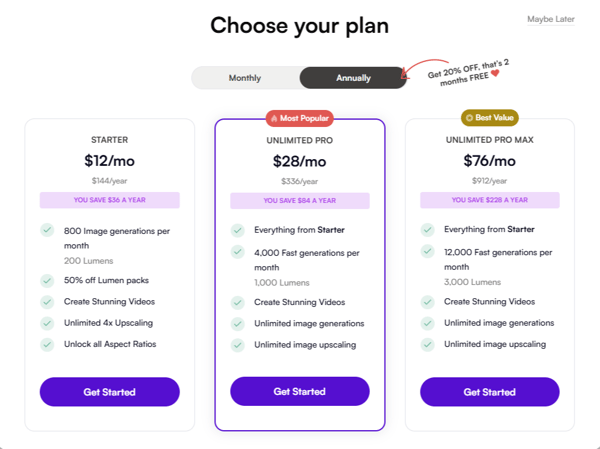
Starter includes: 800 image generations per month (+ 200 Lumens), 50% off Lumen packs, video generation, unlimited 4x upscaling, all aspect ratios.
Unlimited Pro adds: 4,000 fast generations per month (+ 1,000 Lumens), unlimited image generations, unlimited upscaling.
Unlimited Pro Max: Everything in Pro, bumped to 12,000 fast generations per month and 3,000 Lumens.
What Lumens Actually Are
Lumens and your monthly generation quota are two separate resources — and this is where it gets confusing.
Your plan's generation count (800/month on Starter, etc.) covers standard-quality fast generations. Lumens are a separate credit currency used for higher-quality "slow" generations and certain advanced features. They deplete independently of your main quota.
Lumen packs, sold separately:
| Pack | Standard Price | With Pro | Per Lumen |
|---|---|---|---|
| 20 Lumens | $9.99 | $4.99 | $0.50 |
| 40 Lumens | $15.99 | $7.99 | $0.40 |
| 100 Lumens | $29.99 | $14.99 | $0.30 |
| 200 Lumens | $49.99 | $24.99 | $0.25 |
| 500 Lumens | $99.99 | $49.99 | $0.20 |
| 1,000 Lumens | $149.99 | $74.99 | $0.15 |
Heavy users have flagged that Lumens burn faster than expected. At $0.50 per Lumen without a Pro subscription, the cost of high-quality generations adds up fast.
The "Free Tier" Problem
StarryAI's official FAQ still reads: "starryai is completely free to use, and you can generate up to 5 artworks for free every day without any watermarks."
That feature no longer exists. There is no free generation path in the current product. The FAQ hasn't been updated to reflect reality.
This matters because you can't test output quality before committing to a paid plan. For a tool where results are genuinely inconsistent, that's a real risk.
Output Quality
Where It Delivers
StarryAI's strongest suit is stylized, artistic imagery. Fantasy illustrations, anime characters, cyberpunk scenes, watercolor textures, oil painting aesthetics — results in these categories are consistently usable, and the 1,000+ style library gives you a wide range to work with.
Each prompt generates four variations in roughly 30–60 seconds. The Evolve feature lets you iterate from a result you like, progressively refining toward a target look. It's one of the more practical tools in the platform — useful when you're close but not quite there yet.
Good use cases: social media graphics, blog thumbnails, concept sketches, custom avatars, anime-style characters, NFT assets, stylized book covers.

Where It Falls Short
Several quality issues have come up consistently across multiple independent testers — enough to treat as reliable patterns, not outliers.
Hands and fingers frequently come out distorted or anatomically off. This is a known weakness across most diffusion models, and StarryAI doesn't do anything special to address it.
In-image text is unreliable. Small type tends to come out garbled. Don't count on it for anything that needs legible words inside the frame.
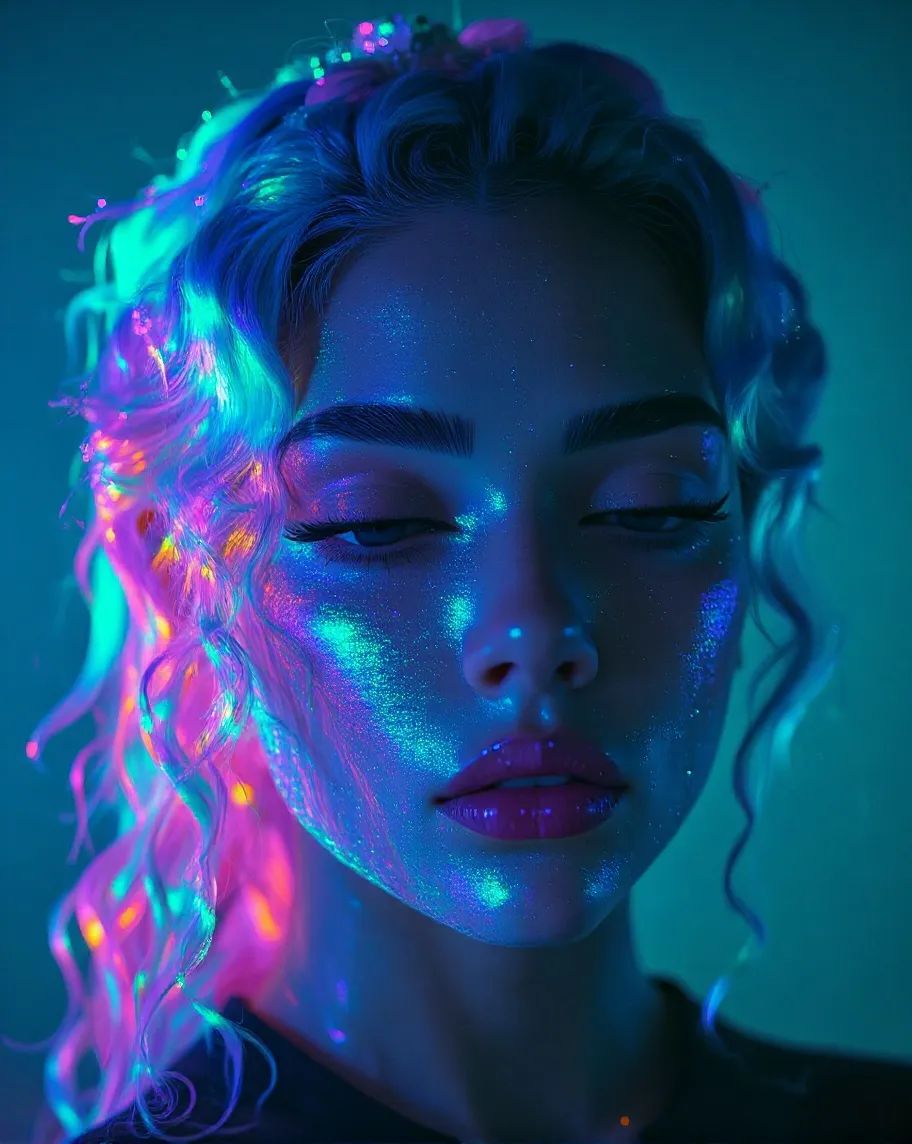
Photorealism is a real weak point. In structured testing, a cinematic photorealistic prompt scored 6/10 — composition and lighting held up, but skin texture leaned toward "digital painting" rather than photography, and fine details like hands and small props broke down. Outputs consistently struggle with hyper-realistic human subjects.
Facial symmetry can drift on detailed close-ups, and background blur is sometimes too heavy-handed.
Limited manual control is the other persistent gap. Beyond prompt engineering, there's very little you can do to steer a generation. What you get is largely what the model decides.


User Experience
The web interface is clean and logically laid out. A first-time user can get to their first generation in under a minute. The Prompt Builder provides structured guidance for people who aren't sure how to phrase their ideas — a genuine help for beginners.
App store ratings: 4.7★ on iOS (App Store), 4.0★ on Android (Google Play, 209K+ reviews). The gap is noticeable, and Android reviews skew more negative overall.
The stability issue is hard to ignore. Across app store reviews and third-party platforms from 2025–2026, paying subscribers describe a consistent cluster of problems: app crashes on launch, persistent black or white screens, slow page loads, and generation errors mid-session. Several users noted things got worse — not better — after renewing their subscriptions.
Customer support has drawn repeated criticism. Multiple users reported going over a week without a meaningful response — tickets acknowledged, nothing resolved. One subscriber got a refund through Apple after two weeks of silence from StarryAI support.
These aren't fringe complaints. They show up across enough platforms and time periods to treat as a systemic issue, not a rough patch.
Ownership Rights
StarryAI's ownership policy is a genuine plus. Full commercial rights on everything you generate. No watermarks. You can sell the work, print it, publish it commercially, or mint it as an NFT — on any plan.
The standard caveat applies: no generating content that infringes on existing IP (Disney characters, brand trademarks, and so on).
How It Compares
| StarryAI | Midjourney | Somake | |
|---|---|---|---|
| Free tier | ❌ | ❌ | ✅ Limited credits |
| Starting price | $15/mo · $12/mo annual | $10/mo | $9.90/mo · $7.92/mo annual |
| Style variety | ⭐⭐⭐⭐⭐ | ⭐⭐⭐ | ⭐⭐⭐⭐ |
| Photorealism | ⭐⭐⭐ | ⭐⭐⭐⭐⭐ | ⭐⭐⭐⭐⭐ |
| Mobile app | ✅ | ❌ | ❌ |
| Beginner-friendly | ⭐⭐⭐⭐⭐ | ⭐⭐ | ⭐⭐⭐⭐ |
If photorealistic quality is your priority, both Midjourney and Somake outperform StarryAI — Somake runs models like Nano Banana and GPT Image that consistently deliver stronger realism at a lower starting price. If mobile creation and style variety are what you're after, StarryAI holds its own. If you want to start with free credits and test quality before committing, Somake is the lower-risk entry point.
Who It's For
StarryAI makes sense if:
You primarily need stylized, artistic imagery — social media posts, blog graphics, personal projects — and photorealism isn't part of your workflow. The style library genuinely delivers in this lane.
You want a tool that works well on your phone. The iOS experience is one of the smoother mobile AI art workflows available right now.
Your monthly volume is moderate. The 800–4,000 generation range covers most casual-to-regular use cases without bumping hard into Lumen costs.
StarryAI doesn't make sense if:
You need photorealistic output for commercial work. Hand artifacts and skin texture issues surface in professional contexts. They're not occasional — they're consistent.
You're a high-volume commercial user. Once you're burning through fast generation quotas and topping up with Lumen packs at $0.40–$0.50 each, the cost structure stops making sense against better-performing alternatives.
You want to test quality before paying. No free tier, no trial. You're committing based entirely on other people's screenshots — a real leap of faith given the inconsistent output reports. Somake offers free credits to start, which is a lower-risk way to evaluate what AI image generation can actually do for your workflow before locking into a paid plan.
You need precise control over composition. Look at Midjourney for a higher quality ceiling, or Stable Diffusion for full open-source control.
Final Verdict
| Dimension | Score |
|---|---|
| Style variety | 4.5 / 5 |
| Photorealistic quality | 2.5 / 5 |
| Pricing / value | 3.0 / 5 |
| User experience | 3.0 / 5 |
| Ownership policy | 4.5 / 5 |
| Overall | 3.5 / 5 |
Bottom line: StarryAI is the right tool if you want stylized art on your phone and you know exactly what aesthetic you're going for. It's the wrong tool if you need photorealism, want to test before paying, or care about getting the most out of your $12/month. For those use cases, Somake offers stronger realism, a free tier, and a lower starting price.
Key Takeaways
The free tier is gone. The official FAQ still claims 5 free daily generations — that feature no longer exists in the current product.
Stylized art is a real strength. Fantasy, anime, cyberpunk, and painterly styles consistently produce shareable results from the 1,000+ preset library.
Don't expect photorealism. Hands, in-image text, and skin texture are recurring weak points across independent tests.
Understand the Lumen system before you subscribe. Monthly generation quotas and Lumens are separate resources. Heavy quality usage can push your real cost well above the plan's headline price.
App stability complaints are widespread and persistent. Crashes, black screens, and slow customer support are reported consistently — check recent reviews before committing.