
SeaArt AI Review 2026: Powerful Models, Hidden Billing Risks
Most SeaArt AI reviews you'll find on Google are already outdated. They still describe it as a "Midjourney alternative for text-to-image." That was 2024. In April 2026, SeaArt has morphed into something far more ambitious — a multi-modal AI platform packing Veo 3.1, Kling 3.0, and cloud-based ComfyUI under one roof.
Sounds impressive, right? It is. But here's the problem: the generation engine is genuinely powerful, while the billing practices are genuinely alarming.
Dozens of users on Trustpilot report being charged for annual subscriptions they never intended to buy. Others describe auto-renewals firing hours before a "3-day trial" actually ends. And the platform itself? Loaded with gacha-style Lucky Boxes, relentless pop-ups, and trackers sending data to TikTok and Yandex.
So is SeaArt AI worth your time — and your credit card number?
After reading this review, you'll know exactly:
What SeaArt can actually do in 2026
How the pricing, Stamina, and Credits system really works — including the gotchas
Which red flags to watch for before you enter your payment info
Whether it deserves a spot in your AI toolkit — or not
What Is SeaArt AI in 2026?
If you search "SeaArt AI review" right now, most results compare it to Midjourney as a simple text-to-image tool.
That framing is at least a year behind.
SeaArt has evolved into a full multi-modal creative platform. Think of it less like "an image generator" and more like "an AI creative hub with a model buffet." Here's what it covers in April 2026:
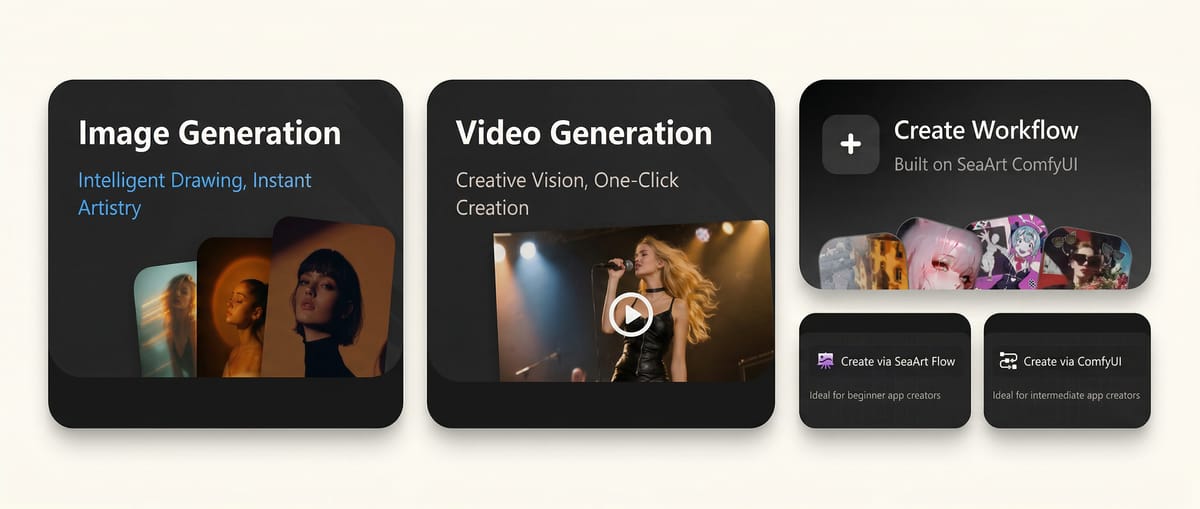
Unlike platforms that build everything in-house (and therefore move slowly), SeaArt takes an aggregator approach — it integrates the best third-party models and lets you pick from the menu. This aggregator model is both SeaArt's greatest strength and the source of its complexity.
Model Ecosystem & Highlights
Credit where it's due — SeaArt's model library in 2026 is genuinely impressive.
| Category | Notable Models Available |
|---|---|
| Image | Flux, SDXL, Nano Banana, Seedream, thousands of community LoRAs |
| Video | Veo 3.1, Wan 2.6, Vidu Q3, Pixverse v6, LTX |
| Workflow | Cloud-hosted ComfyUI with drag-and-drop nodes |
For creators who want to generate the same scene across different engines and compare outputs, SeaArt eliminates the hassle of juggling multiple accounts and billing systems.
Cloud ComfyUI: SeaArt's Most Underrated Feature
If you've ever tried running ComfyUI locally, you know the pain: Python dependency conflicts, VRAM limitations, CUDA errors, model downloads devouring your SSD. It's an incredibly powerful tool locked behind a steep technical barrier.
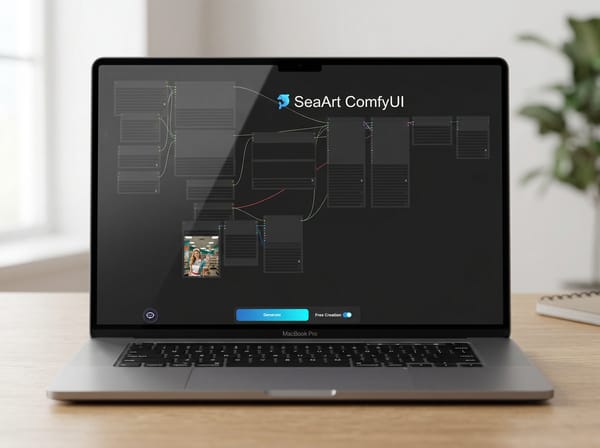
SeaArt runs the entire ComfyUI environment in the cloud. You open a browser tab, drag nodes around, connect workflows, and the rendering happens on their GPUs. No installation. No terminal commands.
Who benefits most?
Creators without powerful hardware — Build complex multi-step workflows (face swap → upscale → style transfer) on a basic laptop
Studios prototyping AI pipelines — Test workflows before committing to local infrastructure
Cloud ComfyUI isn't flawless. Latency exists. Queue times during peak hours can stretch. And you're dependent on SeaArt's servers staying online. But for accessibility alone, this feature sets SeaArt apart from most competitors.
SeaArt's technology genuinely delivers. The problems live everywhere else — in the pricing, the UX, and the business practices surrounding that technology.
A Note on Output Quality
Since SeaArt is an aggregator, output quality is determined by the underlying model, not SeaArt itself. The same prompt on Veo 3.1 will look essentially the same whether you run it through SeaArt or Google's native interface. What SeaArt adds is combinability — chaining Image → LoRA → Upscale → Video inside one interface, especially via Cloud ComfyUI — and access to 10,000+ community LoRAs for fine-tuning aesthetics that vanilla platforms can't match.
The tradeoff? Dependency. SeaArt doesn't own these models. If a provider pulls API access, that capability vanishes from your workflow overnight.
SeaArt's technology genuinely delivers. The problems live everywhere else — in the pricing, the UX, and the business practices surrounding that technology.
Which brings us to what you're actually paying for all of this.
Pricing: Stamina, Credits & SVIP
SeaArt runs two parallel currency systems on top of its subscription tiers. Here's how they differ:
| Stamina | Credits | |
|---|---|---|
| Source | Auto-granted daily (130/day for free users; more for paid tiers) | Purchased directly, or earned through events & community tasks |
| Accumulates? | ❌ No — unused Stamina vanishes at midnight | ✅ Yes — valid for 90 days to 2 years depending on source |
When you hit "Generate," Stamina drains first. Once it's gone, Credits kick in. If both are zero, you wait until tomorrow — or buy more.
SeaArt SVIP Subscription Plans (April 2026)
Here's what the tier structure looks like in plain text (always verify on SeaArt's website — app prices may differ):
Free: 130 Stamina/day. Max 2 queued tasks, 1 concurrent. No LoRA training. No payment info required.
Beginner & Standard: More daily Stamina and higher concurrency limits than Free, but no LoRA training and no "unlimited" premium model access. These are the tiers most likely sold through the 3-day trial (see billing red flags below).
Professional: The minimum viable tier for LoRA workflows — grants priority training queue access. Still no unlimited premium models.
Master ($149.99/mo): The only tier with "unlimited" generation on select premium models and the fastest (Supreme) LoRA training queue.
All tiers offer annual billing at a discounted monthly rate — but you're charged the full year upfront in a single transaction. The $251.88 charge reported by multiple Trustpilot users corresponds to an annual plan billed this way.
⚠️ Bottom line: There's a steep jump between "Standard" and the tiers that actually unlock SeaArt's differentiating features (LoRA training, unlimited premium models). Make sure you know which tier you're actually signing up for — the 3-day trial doesn't always make this obvious.
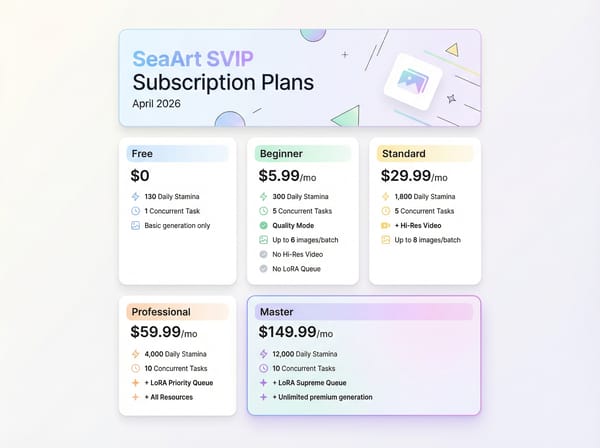
The Master plan unlocks unlimited generation for a selection of premium models — models like Seedream, Vidu Q3 Turbo, Nano Banana, Pixverse v6, Kling 3.0 Image, and SeaArt's own Film Edit and Opera models. Every tier below Master gets no unlimited access to these.
Sounds straightforward? It's not. Here's why:
Some "unlimited" models come with expiration dates. For example, at the time of our research, Seedream 5.0 showed an expiration date just days away — meaning your "unlimited" access to that specific model version could vanish within the same billing cycle you paid for.
Others say "Valid for a long time after purchase." That's the platform's actual phrasing. Not "permanent." Not "lifetime." Just... "a long time." You're trusting the platform's goodwill for continued access — without any contractual commitment from their side.
Similarly, if you're a creator who needs to train custom LoRA models:
Beginner and Standard: No LoRA training queue at all
Professional: Priority queue
Master: Supreme queue (fastest)
This makes Professional the minimum viable tier for LoRA workflows — not Beginner.
🚩 Billing Red Flags
I don't use the word "alarming" lightly. But the billing complaints around SeaArt are consistent, specific, and alarming.
Red Flag 1: The "Free Trial" That Costs $251.88
Multiple users describe nearly identical experiences:
They sign up for a 3-day free trial
The subscription page displays monthly pricing
They assume they'll be billed monthly
Instead, they get charged for a full annual subscription — often before the 72-hour trial actually ends
They request an immediate refund (having used zero features)
Refund denied. Support copy-pastes a "no refund" policy template.
This isn't one disgruntled user. It's a pattern:
"SeaArt's interface is intentionally misleading. On March 21, without any explicit final confirmation step or clear warning, they auto-charged my Visa card a massive $251.88 for an annual subscription."
— Trustpilot user review
And SeaArt's own FAQ essentially acknowledges the timing trick:
"Due to regional differences and network latency, the charge may be processed a few hours earlier. Therefore, to ensure timely cancellation, we recommend canceling your subscription at least one day in advance."
— SeaArt official FAQ
Translation: Your "3-day trial" is effectively a 2-day trial. Miss the window by a few hours, and you're locked into a full annual charge with no refund.
EU-based readers: The EU Consumer Rights Directive (2011/83/EU) includes a 14-day withdrawal right for digital services, though exceptions may apply once you've started using the service. Consider consulting your national consumer protection authority or bank for dispute options. (This is not legal advice.)
Red Flag 2: App vs. Web Price Discrepancies
Multiple users report that pricing differs significantly between the SeaArt mobile app and the website — with the app typically charging more due to App Store/Google Play fees. This difference isn't disclosed upfront.
Always compare prices on the web version before buying anything through the app.
How to Protect Yourself If You Try SeaArt
✅ Use a virtual credit card (Privacy.com, Revolut, etc.) with a strict spending limit
✅ Set a calendar reminder for Day 1 (not Day 3) to decide whether to cancel
✅ Screenshot every step of the subscription flow
✅ Assume annual billing is the default — read every screen twice
✅ Subscribe via the website, not the app
✅ Start with the free tier (130 Stamina/day). Don't pay until you're certain.
UX: Pop-Ups, Trackers & Crashes
Even if you dodge the billing issues, SeaArt's day-to-day user experience has its own problems.
Interface & Performance Problems
The website and app consume enormous amounts of memory and crash frequently. For users running Cloud ComfyUI workflows that take minutes to build, a mid-session crash means starting over — with no auto-save to fall back on.
When the app isn't crashing, it's shouting at you. SeaArt's interface is cluttered with gaudy pop-ups pushing limited-time offers that "end soon!" yet keep returning. Seasonal events. Discount banners. Lucky Box promotions. You can dismiss some temporarily, but they resurface within a day.
For a creative tool where visual clarity matters, the combination of instability and visual noise actively interferes with the workflow.
Privacy Concerns: Third-Party Trackers
Users have observed that SeaArt's website runs multiple third-party trackers and sends data to TikTok, Yandex, and other external services.
Running third-party analytics isn't unusual for web platforms. However, the combination of trackers (TikTok Pixel + Yandex Metrica + others) on a creative platform handling user-generated content is worth noting — especially for professional users with data sensitivity requirements.
Trust & Ethics
Beyond billing and UX, there are two deeper trust questions: how SeaArt handles content, and where its massive model library actually comes from.
The CivitAI Controversy: Model Sourcing Ethics
Starting in late 2023 and continuing into 2025, SeaArt was repeatedly accused of automatically copying models from CivitAI — the largest open-source AI model community — and displaying fabricated download and engagement statistics on those copied model pages. Original model creators reported their work appeared without consent, and removal required filling out a form and waiting up to a week. As of April 2026, there's no public indication that this practice has been fully resolved.
This doesn't mean every model on SeaArt is unauthorized. Many creators actively publish on SeaArt. But the systematic copying with falsified metrics goes beyond normal open-source redistribution.
That massive model library you see? Some portion may not be there with the original creator's blessing.
So where does all of this leave SeaArt when stacked against the competition?
The Verdict
SeaArt is a sports car with a questionable dealership.
The vehicle performs. The engine lineup is genuinely impressive. The Cloud ComfyUI feature alone makes it worth bookmarking. But every interaction outside the driver's seat — the paperwork, the fine print, the surprise charges, the Lucky Box pop-ups — erodes the trust that performance should build.
Impressive technology, problematic everything-else. Whether SeaArt fixes the "everything-else" will determine whether it becomes a market leader or a cautionary tale.
Who Is SeaArt Actually For?
✅ Good fit:
Independent creators who want to compare outputs across multiple AI models without managing separate accounts
Hobbyists and learners who want Cloud ComfyUI access without owning a GPU
Small studios prototyping AI pipelines before investing in local infrastructure
❌ Poor fit:
Enterprise or client-facing teams who need predictable content moderation and billing transparency
Privacy-conscious professionals uncomfortable with TikTok/Yandex tracking on a creative platform
Anyone who treats their AI platform as critical infrastructure — SeaArt's aggregator model means capabilities can disappear overnight if an API provider pulls access
✅ Pros
2026's broadest multi-model aggregation platform (image + video + workflow)
Cloud ComfyUI is genuinely valuable for GPU-less creators
Free tier usable for light testing without payment info
LoRA training without local hardware
Access to frontier video models in one interface
❌ Cons
Subscription billing has extensively documented issues (auto-renewal traps, early charges, no refunds)
"Unlimited" model access on Master plan comes with hidden expiration dates and vague validity terms
Interface cluttered with pop-ups and gacha mechanics
Third-party trackers (TikTok / Yandex) raise privacy concerns
Part of the model library has unresolved ethical sourcing issues
What About Alternatives?
If SeaArt's red flags give you pause, you're not without options in April 2026:
For image generation with simpler pricing: Midjourney remains the quality-per-prompt benchmark with straightforward subscriptions.
For AI video generation: Runway and Kling AI offer dedicated video platforms with more transparent billing than SeaArt's Credit model.
For cloud ComfyUI specifically: RunComfy is a dedicated cloud ComfyUI service — narrower than SeaArt overall, but more focused and without the billing baggage.
No single platform replaces everything SeaArt offers. That breadth is its genuine competitive moat. But a focused two-tool stack (one for images, one for video) often delivers 90% of the capability with none of the trust overhead.
Key Takeaways
SeaArt is no longer just an image generator. It's a multi-modal platform with access to top-tier 2026 models. Old reviews dramatically undersell its capabilities.
The 3-day trial is a trap for the unwary. Use a virtual card. Cancel on Day 1 if unsure. Assume annual billing is the default.
The free tier (130 Stamina/day) is genuinely usable for light testing. Start there. Don't enter payment information until you've confirmed the platform fits your workflow.
"Unlimited" doesn't mean what you think. Even on the $149.99/month Master plan, some models have hard expiration dates, and others use vague "valid for a long time" language.
Keep your work portable — and your options open. Don't build your entire workflow on a platform with unresolved trust issues. Export prompts, save assets locally, and know that focused alternatives exist for every major SeaArt feature (Midjourney for images, Runway/Kling for video, RunComfy for cloud ComfyUI).
FAQ
Last updated: April 2026. This review is based on publicly available pricing data, Trustpilot user reports, platform documentation, and hands-on evaluation. We have no affiliate relationship with SeaArt AI.