Честный разбор нового ИИ-набора от Artlist, их собственной модели Original 1.0 и «режиссерского кресла» Studio: что здесь правда, что — хайп, и кому на самом деле стоит за это платить.
Скорее всего, вы до сих пор воспринимаете Artlist как «тот самый сайт, где можно скачать музыку без авторских прав».
Справедливо. Таким Artlist был года три назад.
В 2026 году компания полностью переродилась в платформу для создания видео полного цикла на базе ИИ. Собственная модель. Новые инструменты управления на уровне режиссера. Единое рабочее пространство, объединяющее генерацию изображений, видео и голоса под одной крышей.
Смелый шаг. Но остается вопрос, на который никто не дает четкого ответа: это реальный технологический скачок или просто старое вино в новой блестящей ИИ-бутылке?
В этой статье мы разберем каждую крупную фичу — ИИ-набор (AI Toolkit), модель Original 1.0, недавно запущенную Studio, а также традиционные библиотеки музыки и футажей, которые и принесли Artlist славу. Мы также проанализировали сотни реальных отзывов пользователей, чтобы подсветить «острые углы», о которых маркетинговые страницы предпочитают молчать.
К концу чтения вы узнаете три вещи:
На что ИИ от Artlist способен на самом деле, а где он все еще проигрывает
Математику кредитов, которую обязательно нужно просчитать перед подпиской
Подходит ли Artlist именно под ваш рабочий процесс или это пустая трата денег
Вердикт в двух словах
| Лучшее для | Видеомейкеров полного цикла, которым нужны музыка, футажи и ИИ-инструменты в одной подписке |
|---|---|
| Не подходит для | Фанатов исключительно ИИ или авторов с ограниченным бюджетом и непредсказуемыми объемами работы |
| Лучший тариф | Max (50,66 $/мес при оплате за год) — оптимальный баланс всех функций экосистемы |
| Главная фишка | Мультимодельное рабочее пространство AI Toolkit + качественная библиотека лицензионной музыки |
| Самый большой риск | Маркетинговые уловки с количеством кредитов + изменение стоимости кредитов в середине контракта |
| Оценка | 7.5 / 10 — отличный продукт, но модель ценообразования подрывает доверие |
Хотите подробностей? Читайте дальше.
Как выглядит Artlist в 2026 году
Если вы не заходили на сайт с 2023 года, трансформация может вас шокировать. Теперь Artlist держится на двух столпах:
| Столп | Что внутри |
|---|---|
| Традиционная библиотека ассетов | Музыка, звуковые эффекты (SFX), футажи в 4K+, шаблоны для монтажа, пресеты цветокора (LUT) |
| ИИ-слой | AI Toolkit (единая среда), Artlist Original 1.0 (собственная модель), Artlist Studio (режиссерский контроль), ИИ-озвучка и клонирование голоса, плагины для редакторов |
Воспринимайте это не как конкурента Runway или Kling, а скорее как цепочку творческого производства под одним логином. Сервис играет на одном поле с CapCut и Envato Elements, но нацелен на профессионалов, которым нужны лицензионные материалы, юридическая чистота и качество «как в кино».
Это позиционирование определяет всё: и сильные стороны Artlist, и его провалы. Начнем с базы — библиотеки ассетов, которая существовала задолго до хайпа вокруг ИИ.
Традиционная библиотека: Главный актив
В погоне за ИИ легко забыть одну вещь: традиционная библиотека Artlist стоит своих денег, даже если вы никогда не прикоснетесь к нейросетям.
Библиотека музыки
Именно здесь Artlist сделал себе имя, и она до сих пор остается лучшей в своем классе.
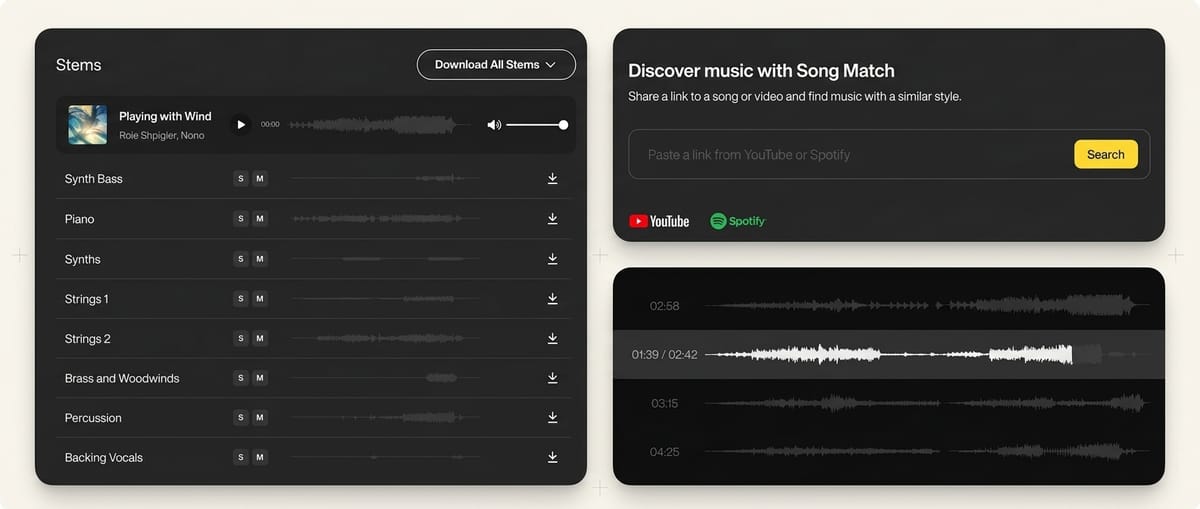
Потолок качества. Треки написаны профессиональными музыкантами по контракту. Живые инструменты, продуманные аранжировки, эмоциональная динамика, которая работает на сюжет, а не просто синтетические петли.
Скачивание «стемов» (stems). Новые треки позволяют скачивать отдельные слои (вокал, барабаны, бас, гитару) по отдельности. Нужна энергия трека, но мешает вокал? Снимайте стем.
Интеллектуальный поиск. Вставьте ссылку на YouTube или Spotify, и сервис найдет музыку с похожим вайбом, безопасную для авторских прав. Раздел «Trending Similar Music» предлагает альтернативы песням, взлетевшим в TikTok или YouTube.
Highlight preview. Плеер сразу перепрыгивает на самую мощную часть трека. Больше не нужно слушать 45-секундное вступление в надежде, что дроп будет крутым.
Очистка прав на YouTube. Привяжите свой канал в настройках, и претензии по авторским правам будут решаться автоматически.
Artlist против Epidemic Sound
| Artlist | Epidemic Sound | |
|---|---|---|
| Размер каталога | Меньше, но тщательно отобранный, высокое качество продакшена | Огромный каталог, больше жанрового разнообразия |
| Доступ к стемам | Да (в новых треках) | Да (в некоторых треках) |
| ИИ-инструменты | Полный набор (картинки, видео, голос, музыка) | Нет |
| Стоковые видео | Да (4K+, включено в план Max) | Ограниченно (в основном музыкальная платформа) |
| Фильтры настроения | Сильные | Чуть более детализированные |
| Для кого лучше | Авторов, которым нужны музыка, видео и ИИ на одной платформе | Авторов, которым нужна только музыка и самый широкий выбор |
Итог: Если вам нужна только музыка, оба сервиса хороши. У Epidemic Sound шире охват, у Artlist — качественнее отбор. Но если вам нужны еще и ИИ-генерация, видеофутажи и шаблоны в одном пакете с профессиональной музыкой, Artlist — это самый полный комплект на рынке. Ни один другой аудиосток и близко не стоит к такой универсальности.
Библиотека видеофутажей
Минимум 4K. Большинство роликов сняты с художественным подходом, а не просто «на склад».
Сюжетные серии. Несколько клипов, объединенных общим светом, цветом и объектом.
Прозрачность с ИИ. Видео, созданное нейросетями, четко помечено. Вы можете включить или выключить его в фильтре.
Log/RAW доступ. Высокие тарифы открывают доступ к исходникам камер для профессионального цветокора.
Всё остальное в пакете
План Max также включает звуковые эффекты (амбиент и фоли), шаблоны монтажа для Premiere Pro / DaVinci Resolve, LUT-пресеты и «Артборды» — подборки ассетов под конкретное настроение. Плагины позволяют скачивать всё это прямо в таймлайн вашего редактора. По отдельности эти функции не заставят вас купить подписку, но в сумме они сокращают количество инструментов (и счетов), которые вам нужно оплачивать.
Artlist против Envato Elements против CapCut
Если вам нужна только музыка, сравнивайте с Epidemic Sound. Но амбиции Artlist в 2026 году шире — они хотят быть вашей единственной подпиской для творчества. На этом уровне реальные конкуренты — Envato Elements и CapCut.
| Artlist | Envato Elements | CapCut | |
|---|---|---|---|
| Сильная сторона | Лицензионная музыка + видео + ИИ-генерация | Огромная библиотека всего подряд | Бесплатный редактор + ИИ-хаб |
| Качество музыки | Премиальное, отобранное вручную | Большой выбор, но разное качество | Базовое / ограниченное |
| Видеофутажи | 4K+, кинематографичные | Много, качество плавает | Минимум |
| ИИ-генерация | Весь спектр + своя модель Original 1.0 | Полный набор (AI Lab) — жесткие лимиты на дешевых планах | Полный набор — есть бесплатный уровень |
| Редактор видео | Studio (весна 2026) + плагины для NLE | Нет | Да (лидер для коротких форматов) |
| Юридическая защита | Максимальная — чистые данные в Original 1.0 + страховка на тарифах Business | Стандартная коммерческая лицензия | Размытая — не хватает серьезных гарантий для бизнеса |
| Кто целевой юзер | Профессиональные видеомейкеры и рекламщики | Дизайнеры, маркетологи, универсалы | Авторы для соцсетей / рилсмейкеры |
Коротко: ИИ-инструменты в 2026 году есть у всех. Разница в другом.
Envato Elements побеждает по охвату ассетов (шрифты, шаблоны сайтов, WP-темы — то, чем Artlist не занимается).
CapCut побеждает по доступности (бесплатный редактор + мощные ИИ-инструменты типа Seedance 2.0 — идеально для блогеров).
Artlist побеждает на стыке профессиональной музыки + качества видео + юридически чистого ИИ. Если ваша работа проходит проверку юристов или крупных клиентов, аналогов этой связке пока нет.
С базой разобрались. Теперь перейдем к ИИ-слою — и тому, почему обновления 2026 года меняют правила игры.
Что нового в 2026-м
Между концом 2025-го и весной 2026-го Artlist выпустил три крупных обновления. Если ваши знания об ИИ Artlist застряли на этапе «просто оболочка над чужими моделями», то нынешняя версия вас сильно удивит.
AI Toolkit: Одно окно для всех нейросетей
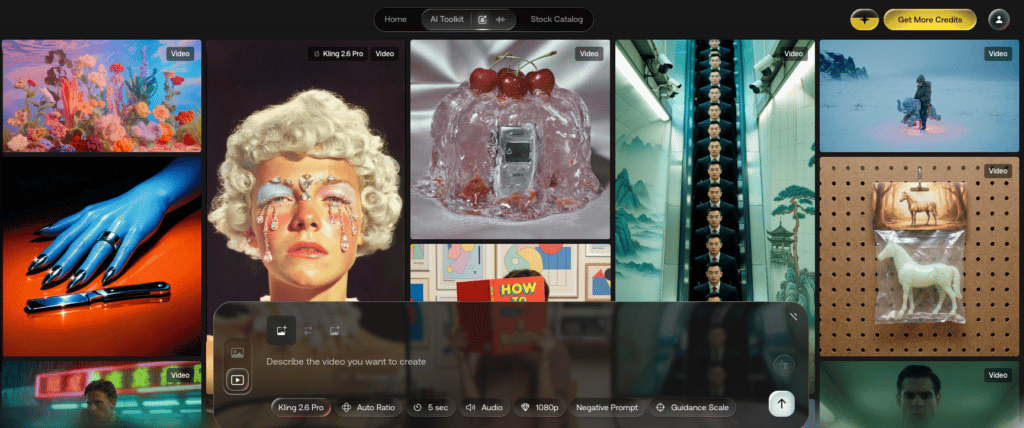
Какую проблему это решает: Десять открытых вкладок. Ассеты разбросаны по пяти сайтам. Сборка проекта превращается в хаос. Если вы когда-нибудь жонглировали Kling, Veo, ElevenLabs и Flux одновременно, вы понимаете эту боль.
Ответ Artlist: AI Toolkit объединяет генерацию картинок, видео, синтез речи и SFX в одном интерфейсе. Тут есть управление проектами по сессиям, сравнение моделей, авто-улучшение промптов и бесшовная интеграция с библиотекой самого Artlist.
Доступные модели:
| Тип | Важные модели | Разрешение / Длительность |
|---|---|---|
| Изображения | GPT Image, Nano Banana, Flux Pro/Ultra | До 2K |
| Видео | Veo 3.1, Kling 3.0, Seedance 2.0 | До 4K / 8–12 секунд |
| Голос | ElevenLabs, Minimax, Shadow | Многоязычность, разные акценты |
| Музыка | Lyria (от Google) | Треки, созданные ИИ |
Примечание: С апреля 2026 года Sora 2 Pro еще числится в списках, но сворачивается, так как OpenAI закрывает продукт. Не стройте на ней свои процессы. Если вы привыкли к Sora, посмотрите наш список лучших альтернатив Sora, на которые стоит перейти.
Важное уточнение: AI Toolkit не создает нейросети сам. Это диспетчерская вышка. Мощь генерации идет от Google, Kling и других. Ценность Artlist здесь в интеграции рабочего процесса, а не в разработке новых моделей. Если вам нужны самые передовые возможности какой-то конкретной модели, оригинальные платформы будут на шаг впереди. Если вам нужно всё в одном месте — Toolkit сделан очень удобно.
Про удобство: Интерфейс чистый и понятный. Смена модели — в два клика. Сессии проекта автосохраняют всё, что вы создали. Судя по отзывам, большинство пользователей осваиваются за 15–20 минут.
Artlist Original 1.0: Юридическая крепость
Какую проблему это решает: Кому принадлежат права на созданное ИИ? Не обучали ли нейросеть на чужих картинках без спроса? Эти вопросы пугают каждого коммерческого автора. Один иск за авторские права может похоронить всю рекламную кампанию.
Ответ Artlist: Original 1.0 — это визуальная модель, обученная исключительно на лицензированном коммерческом видео самого Artlist. Никакого парсинга интернета. Обучена с нуля на материалах, на которые у Artlist есть все права.
Она поддерживает четыре стиля — Cinematic (Кино), Professional (Профи), Indie (Инди) и Commercial (Рекламный).
Почему это важно: Каждый кадр из Original 1.0 юридически чист. Никаких лицензионных «дыр». Для рекламных агентств и брендов это критический уровень защиты.
Но будем честны: по качеству картинки и гибкости Original 1.0 пока уступает гигантам вроде Veo 3.1 или Kling 3.0. Если вы ищете фотореализм следующего уровня, эти модели всё еще впереди. Original 1.0 конкурирует в другой плоскости — безопасности бизнеса.
Представьте это так: Veo 3.1 — это болид Формулы-1. Original 1.0 — это застрахованный служебный автомобиль с видеорегистратором, доказывающим вашу правоту в суде. Разные инструменты для разных задач.
Studio: Контроль уровня режиссера
Обычно работа с ИИ-видео выглядит так: ввел промпт, подождал, результат не понравился, ввел новый. Вы как будто играете в игровой автомат.
Studio, запущенная весной 2026-го, меняет это, но важно понимать как.
Studio — это слой оркестрации. Постоянные персонажи работают на модели Nano Banana, а композиция кадра опирается на возможности Kling и Veo. Artlist создал интерфейс, который связывает эти функции в единый процесс: один раз задаете героя, назначаете типы шотов, собираете последовательность, накладываете музыку и голос, не выходя из редактора.
Artlist — это режиссерское кресло, а не камера. Если Nano Banana станет лучше завтра, Studio тоже станет лучше. Если нет — редактор останется прежним.
Полный доступ к Studio требует тарифа AI Professional ($89,99/мес) или выше. В стартовом пакете доступ ограниченный.
Что говорят первые юзеры: Постоянные персонажи — самая сильная фишка. Реализация Artlist одна из самых удобных для сохранения лица и одежды героя между кадрами. Композиция шотов попадает в цель в 90% случаев. Слабое место — освещение между сценами, на улице при естественном свете оно может прыгать. Будьте готовы к цветокоррекции на посте.
Честный отзыв: Studio превращает ИИ-видео из лотереи в «первый черновик по брифу». Это значимый шаг вперед для коммерческой работы, где важна последовательность кадров.
Это были стратегические изменения. Теперь посмотрим, как эти фичи работают в реальном производстве.
Генерация ИИ на практике
Будем прямолинейны: большинство функций ИИ-набора сегодня — это стандарт.
Доступ к куче моделей? Это умеет любой агрегатор. Сравнение бок о бок? Это есть в Open Art, Freepik и десятке других. Улучшение промптов? Базовая штука с 2024 года.
Если вы идете в Artlist только ради этого — не тратьте деньги. Есть сервисы дешевле.
Что же тогда действительно выделяет их? После глубокого анализа мы нашли одно реально важное отличие, и оно вообще не связано с качеством генерации.
Преимущество интеграции
Вот оно. Реальное конкурентное преимущество. Не модели, не кнопки, а тот факт, что сгенерированные ИИ ассеты и профессиональная стоковая музыка живут в одном проекте.
Вот как это выглядит в деле:
Допустим, вы создали 5-секундный футаж дождливого Токио через Kling 3.0. У клипа есть родной звук дождя. Отлично. Но видео нужна меланхоличная партия пианино и фоновый шум ветра.
На любой другой ИИ-платформе ваши шаги:
Экспорт клипа → открыть Artlist (или Epidemic Sound) в новой вкладке → искать пианино → прослушать → скачать → искать звук ветра → скачать → открыть Premiere → импорт трех файлов → выравнивание → монтаж.
Внутри Artlist вы ищете музыку и звуки, не покидая рабочее пространство проекта. Примерили аудио к клипу. Скачали. Всё уже лежит в одной папке проекта. Никаких вкладок и путаницы в файлах.
На бумаге это звучит как мелочь. На практике это убирает «налог на сборку» — те самые 15–20 минут на переименования и импорт после каждой генерации. Сделайте так пять раз за день, и вы сэкономили час жизни на логистике.
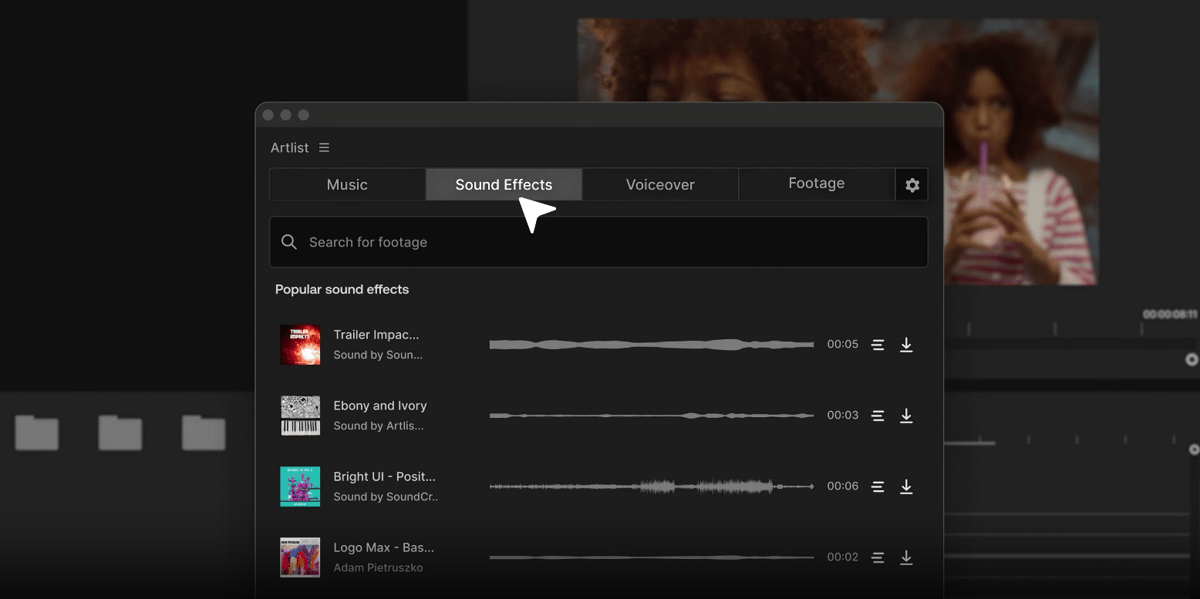
Плагин для Premiere Pro расширяет это еще больше. Вы можете искать, слушать и кидать в проект как стоки, так и свои ИИ-генерации прямо внутри монтажки. Ни один другой сервис не дает такой глубины интеграции. Есть плагины и для AE, DaVinci и Final Cut, но в Premiere интеграция самая глубокая.
Сколько стоят кредиты на самом деле: Проверка реальностью
Стандартный путь: сначала создать картинку-концепт, потом анимировать ее в видео (image-to-video). Посмотрим, сколько это стоит в кредитах Artlist.
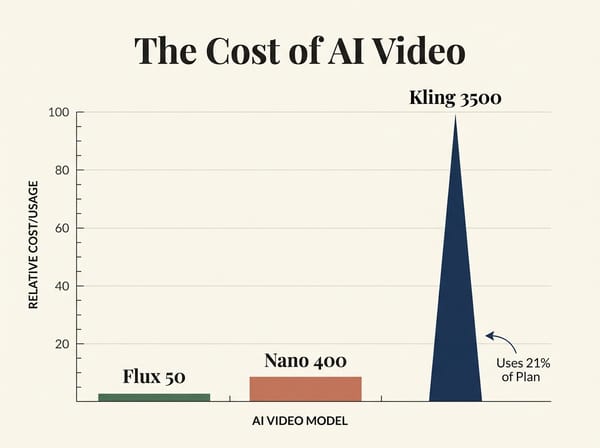
Реальная математика:
| Шаг | Модель | Кредиты | Заметки |
|---|---|---|---|
| Черновой набросок | Flux Dev | ~50 | Дешево. Ищите идею тут. |
| Чистовая картинка | Nano Banana Pro | ~400 | Тратим только когда утвердили композицию. |
| Анимация в видео | Kling 3.0 (img2vid, 5 сек) | ~3 500 | Один этот шаг съедает 21% месячного лимита на тарифе Starter. |
Один качественный 5-секундный ролик стоит ~3 950 кредитов.
На тарифе Starter (16 500 кредитов в месяц) это примерно 4 готовых клипа в месяц. При условии, что у вас всё получилось с первого раза без экспериментов. В реальности клипов будет еще меньше.
Почему это важно?
Потому что на странице цен Artlist утверждает, что этих 16 500 кредитов хватит «до 103 видео». Это число правда только если генерировать в самой дешевой модели, в низком разрешении и минимальной длительности — так в продакшене никто не делает.
Это как если бы автопроизводитель обещал «1000 км на одном баке», замеряя расход при скатывании машины с горы с выключенным двигателем.
И самое главное: математику нельзя проверить до покупки. Стоимость генерации в каждой модели не указана на странице цен. Вы увидите её только после того, как оплатите подписку. Запомните это — мы вернемся к этому в разделе рисков.
Честные ограничения
1. Вы платите наценку посреднику.
Artlist не владеет большинством этих моделей, он перепродает доступ к ним. Стоимость одной генерации выше, чем если идти к разработчикам напрямую. Для тех, кто делает по 50+ видео в месяц, переплата составит сотни долларов в год. Посчитайте свои объемы перед покупкой.
2. Качество генерации такое же, как у оригинала.
Так как Artlist обращается к тем же API, что и другие, результат из Kling внутри Artlist будет таким же, как в самом Kling. Это хорошо (качество не режут), но это значит, что Artlist не наколдует вам магически картинку лучше, чем сама нейросеть. Ценность здесь в удобстве, а не в эксклюзивности технологий.
Голос: Тихий отличник в углу
Озвучка — это та область, где Artlist дает честную ценность почти без оговорок.
Text-to-Speech (Текст в речь). Качество профессиональное. Можно использовать в финальных роликах, а не только как «черновик».
Voice-to-Voice (Голос в голос). Крутая фишка: запишите себя, как вы читаете текст с нужной эмоцией, и замените свой голос на любой из библиотеки. Это дает контроль над актерской игрой, который не даст простая генерация из текста. И это стоит копейки в кредитах.
Клонирование голоса. Оно неплохо передает тембр и акцент, но это не идеальная копия. Для брендового контента — ок, но маму вы вряд ли обманете.
Кредиты на голос тратятся очень экономно по сравнению с видео. Если вы делаете контент с дикторской озвучкой, одна эта функция может окупить подписку.
С функциями разобрались. Теперь о главном: о деньгах и тарифах.
Цены и кредитная система
Всё еще читаете? Отлично, потому что следующий раздел поможет вам либо сэкономить, либо не потерять деньги.
Здесь начинаются неудобные моменты.
Тарифы AI Suite (Только ИИ-инструменты, без стоков)
| Тариф | Цена в месяц (за год) | Кредиты в месяц | Доступ к Studio |
|---|---|---|---|
| AI Starter | $11.99 | 16 500 | Базовый |
| AI Professional | $89.99 | 180 000 | Полный |
| Enterprise | По запросу | Индивидуально | Полный + юр. защита |
Тарифы на каталог стоков (Традиционные ассеты + ИИ)
| Тариф | Цена в месяц (за год) | Что включено | ИИ-кредиты |
|---|---|---|---|
| Music & SFX | $9.99 | Музыка, стемы, эффекты, плагин для Premiere | Нет |
| Max | $50.66 | Весь сток + AI Toolkit + Studio + приоритетная генерация | 16 500 |
| Max Business | $399 | Всё в Max + бизнес-лицензия + команда (до 7 чел) + юр. страховка | 180 000 |
Годовая подписка экономит до 40% стоимости.
На заметку: Тариф Max дает столько же кредитов (16 500), за сколько просят $11,99 в тарифе AI Starter. Дополнительные ~$39 вы платите за доступ ко всей библиотеке музыки и видео. Если стоки вам не нужны, просто берите AI Starter.
Кредиты не переносятся, и «докупить» нельзя
Два факта, которые не афишируют на главной странице:
1. Неиспользованные кредиты сгорают в конце месяца. Никакого накопления. Если месяц был спокойным и вы потратили всего 5 000 из 16 500, остальные 11 500 просто исчезнут.
2. Нельзя просто докупить пачку кредитов. На апрель 2026 года кнопки «Докупить кредиты» нет. Если лимит кончился на второй неделе, придется либо переходить на тариф дороже, либо ждать следующего месяца.
Это означает, что бюджет кредитов — это жесткий потолок по принципу «используй или потеряешь». Планируйте работу так, чтобы основные ИИ-задачи выпадали на один период.
Сценарий из жизни: На сколько хватит кредитов фрилансеру?
Представим, вы делаете 4 ролика для YouTube в месяц. Для каждого видео вам нужно:
- Музыка и звуки (бесплатно в Max).
- 3 клипа B-roll через ИИ (Kling 3.0, 5 сек) = 10 500 кредитов.
- Озвучка вступления (100 слов) = ~33 кредита.
- Обложка ролика (Nano Banana) = ~400 кредитов.
На один ролик: ~10 933 кредита. → На месяц (4 ролика): ~43 732 кредита.
На тарифе Max (где 16 500 кредитов) вы вылетите из лимита еще до того, как доделаете второе видео.
Честный вывод: Если ИИ вам нужен изредка (пару кликов в месяц), тарифа Max хватит. Но воспринимайте кредиты там как бонус, а не как основной рабочий инструмент.
Сравнение стоимости генерации
Как Artlist выглядит на фоне конкурентов? (Берем 5 секунд видео как стандарт):
| Платформа | Тип | Veo 3.1 (5с) | Kling 3.0 (5с) |
|---|---|---|---|
| Open Art | Агрегатор | $2.19 | $0.29 |
| Artlist (AI Prof.) | Сток + ИИ | $2.50 | $1.75 |
| Freepik | Сток + ИИ | $2.60 | $0.54 |
По чистой цене генерации Artlist — середняк или даже дорогой сервис. Но это если смотреть на ИИ в вакууме. Если вы и так платите за музыку, футажи и эффекты по отдельности, «комбо» от Artlist может оказаться выгоднее.
Пробный период и возврат денег
На апрель 2026 года у Artlist нет бесплатного пробного периода. Ни демо-версии, ни бесплатных кредитов. Годовые планы обычно не подлежат возврату. Совет: начните с одного месяца оплаты — это выйдет дороже за месяц, но даст вам путь к отступлению без риска потерять всю сумму за год.
⚠️ Три риска, о которых нужно знать
На основе жалоб сотен пользователей:
Риск 1: Невидимые цены до покупки. Обещание «до 103 видео» вводит в заблуждение. Нет публичного калькулятора кредитов. Вы покупаете кота в мешке, не зная, сколько на самом деле спишут за генерацию в хорошем качестве.
Риск 2: Изменение «цен» в кредитах. Были случаи, когда Artlist повышал стоимость генерации в кредитах после того, как люди оплатили год. Например, раньше на лимит можно было сделать 400 видео, а стало 100 — деньги те же, а выхода продукта в 4 раза меньше.
Риск 3: Сложность понижения тарифа. Перейти на тариф повыше можно мгновенно. Чтобы перейти на тариф дешевле, нужно писать в поддержку и ждать ответа неделями. Некоторые пользователи просто отменяли подписку и заводили новый аккаунт, теряя наработки.
Лицензия: Мелкий шрифт
Многие думают: «Я скачал ассет, теперь он мой навсегда». Это не совсем так.
По текущим правилам, вы можете использовать скачанные материалы только в проектах, выпущенных во время действия вашей подписки. Если вы отменили подписку, те треки, что лежат у вас на диске, нельзя законно вставлять в ваши новые проекты.
Важно: Прочитайте условия лицензии от корки до корки перед оплатой. Разрыв между «я думал» и «в контракте написано» — главная причина обид на сервис.
Плюсы и минусы Artlist
✅ Плюсы
Глубочайшая интеграция. Музыка + видео + чистый ИИ + плагины для монтажа в одном месте. Лучший выбор для тех, кому важна юридическая чистота.
Топ-библиотека музыки. Кураторский отбор, доступ к отдельным инструментам (стемы) и умный поиск.
Безопасность Original 1.0. Своя нейросеть на своих данных — никаких проблем с авторским правом.
Интеграция с Premiere Pro. Прямой доступ к ассетам из таймлайна экономит кучу времени.
Отличные инструменты озвучки. Профессиональный голос и удобная замена своего голоса на дикторский.
❌ Минусы
Непрозрачная система кредитов. Цены на модели скрыты, маркетинговые обещания завышены.
Кредиты не переносятся. Либо тратишь всё до конца месяца, либо они сгорают.
Риск изменения условий. Могут менять стоимость генерации для текущих подписчиков.
Переплата посреднику. Напрямую в Kling или Runway генерировать часто дешевле.
Строгие условия лицензии. Ограничения на использование после отмены подписки могут стать сюрпризом.
Итоговая оценка
| Параметр | Баллы |
|---|---|
| Качество контента (музыка/видео) | 9 / 10 |
| Мощность ИИ-инструментов | 7 / 10 |
| Прозрачность цен и выгода | 5.5 / 10 |
| Удобство интерфейса (UX) | 8 / 10 |
| Юридическая безопасность | 9 / 10 |
| Общая оценка | 7.5 / 10 |
Кому на самом деле подходит Artlist?
✅ Вам стоит брать Artlist, если вы:
Видеомейкер полного цикла. Если вам нужны музыка, звуки, футажи и немного ИИ сразу. Тариф Max заменяет 3-4 разных подписки.
Работаете с брендами и рекламой. Юридическая чистота материалов для вас на первом месте.
Заядлый пользователь Premiere Pro. Плагины реально экономят время при монтаже.
Умеренный пользователь ИИ. Вы генерируете пару клипов в неделю, а основную часть контента берете из библиотек.
❌ Вам лучше поискать другое, если вы:
ИИ-энтузиаст на максималках. Вы делаете десятки ИИ-видео в месяц — кредиты у Artlist улетят мгновенно, дешевле идти напрямую в Kling/Runway.
Вам нужен только ИИ. За те же деньги другие платформы дадут больше моделей и больше генераций.
Ограничены в бюджете. Скрытые цены и жесткие лимиты кредитов — это финансовый риск.
Делаете разовый проект. Лицензия Artlist не очень дружелюбна к тем, кто хочет «подписаться на месяц, скачать всё и уйти».
Часто задаваемые вопросы (FAQ)
Итог: 5 главных выводов
Уходя с этой страницы, запомните следующее:
1. Фишка Artlist не в «супер-ИИ», а в интеграции и безопасности. По отдельности нейросети на других сайтах могут быть круче. Но профессиональная музыка + 4K видео + юридически чистый ИИ в одном окне — это уникальное комбо. Тариф Max за 50,66 $ — точка максимальной выгоды.
2. Обновления 2026 года — это реальный шаг вперед. AI Toolkit убирает хаос в инструментах, Original 1.0 убирает страх перед судами. Если вы пробовали сервис раньше и вам не зашло — сейчас самое время взглянуть снова.
3. Считайте кредиты сами. Берите за основу Kling 3.0 (~3 500 кредитов за клик), а не рекламные обещания про «сотню видео». Помните: кредиты сгорают каждый месяц.
4. Лицензия не вечна. Перечитайте условия использования после отмены подписки. Вариант «накачать на всю жизнь вперед» здесь официально не работает.
5. Начните с ежемесячной оплаты. Проверьте, сколько кредитов вы реально тратите. Переходите на год только когда поймете, что лимитов вам хватает и платформа вам подходит.
Продукт заслуживает 7.5. Доверие клиентов — пока чуть меньше.
Этот обзор подготовлен командой Somake AI. Мы следим за миром креативного ИИ. Больше сравнений и гайдов ищите в нашем блоге.