
You subscribed to the Standard plan for $10. You generated a few videos. By week two, your credits were gone.
That's not a bug. That's how PixVerse pricing works — and once you understand the mechanics, it's entirely preventable.
All data is verified from the official PixVerse pricing page.
What Is PixVerse AI?
PixVerse is an AI video generator that turns text prompts or images into short video clips in 30–60 seconds. It's built for social media creators, marketers, and hobbyists who need fast, visual content without a production team. If you want to compare PixVerse against Kling or Seedance without juggling separate accounts, Somake runs all three in one place.
The pricing feels simple at first — a few tiers, a monthly fee. The complexity lives in the credit system, which controls how many videos you can actually make and at what quality.
Plans at a Glance
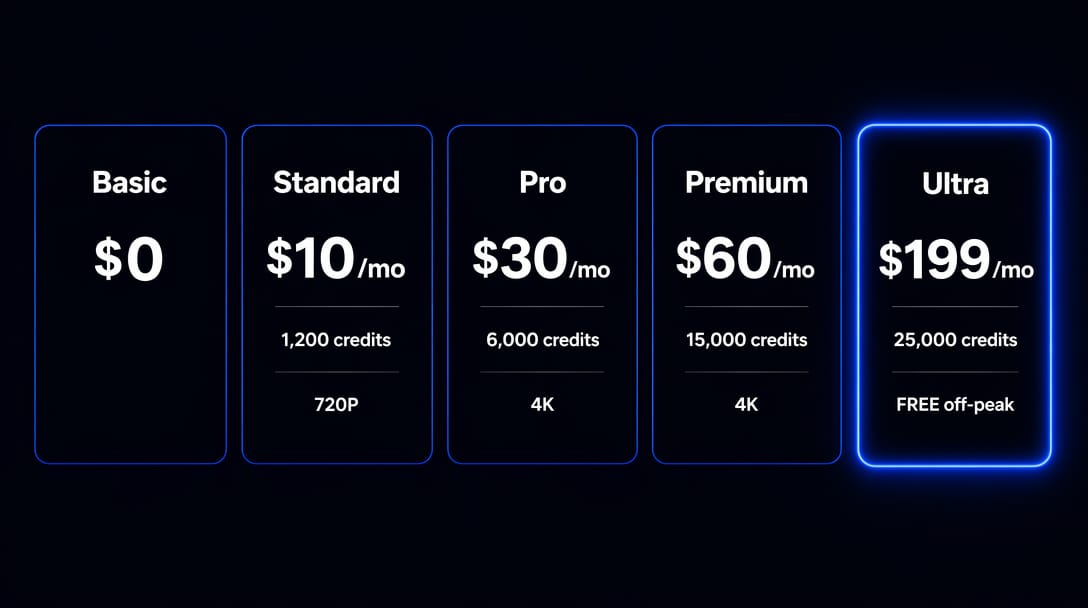
PixVerse offers six consumer plans plus an Enterprise option. Here's the full picture, verified from the official pricing page:
| Plan | Monthly Price | Annual Price | Monthly Credits | Max Resolution | Concurrent |
|---|---|---|---|---|---|
| Basic | Free | Free | — | Watermarked | 2 |
| Standard | $10/month | $8/month ($96/yr) | 1,200 | 720P | 3 |
| Pro | $30/month | $24/month ($288/yr) | 6,000 | 4K | 5 |
| Premium | $60/month | $48/month ($576/yr) | 15,000 | 4K | 8 |
| Ultra | $199/month | $149/month ($1,788/yr) | 25,000 | 4K | 8 |
| Team Premium | $99/seat/month | $79/seat/month ($948/yr) | 20,000/seat | 4K | 12 |
| Enterprise | From $100 | — | Custom | Custom | Custom |
Annual billing saves 20% on Standard, Pro, and Premium — and 40% on Ultra (dropping from $199 to $149/month). If you're confident PixVerse fits your workflow, paying annually on Ultra saves $600 per year.
The single most important thing in that table: Standard plan caps at 720P. Not 1080P. Not 4K. If you need professional-quality output, Standard will not deliver it — you need Pro or above.
Each plan also unlocks savings on Credit Packs and off-peak generation:
Standard: +10% bonus on Credit Pack purchases, 20% Preview Mode discount
Pro: +30% Credit Pack bonus, 30% Off-Peak savings, Batch Creation
Premium: +50% Credit Pack bonus, 50% Off-Peak savings, Batch Creation
Ultra: +50% Credit Pack bonus, 100% Off-Peak savings (free generation during off-peak hours), Batch Creation
Team Premium: Shared credit pool, role-based access, 12 concurrent generations, centralized billing
Free Tier
The Basic plan is free. It gives you 90 initial credits when you sign up, plus 60 credits that reset every day at 0:00 AM UTC.
Here's the catch: daily credits expire at the end of the day if you don't use them. Log in on Tuesday and skip Wednesday — those 60 credits are gone.
At V5.5 540P quality (45 credits per 5-second clip), the free plan gives you roughly one video per day. That's enough to genuinely test the platform and get a feel for what it produces.
What it won't give you: watermark-free exports, access to premium models, or any resolution above the platform's basic output. Every video you download on the free plan has a PixVerse watermark — unusable for client work or anything public-facing that represents your brand.
The free plan is real for slow experimentation. It's a demo for anything else.
Credits
This is where most users get surprised. PixVerse has three distinct credit types, each with different rules.
Three Types, Three Rules
The official FAQ is clear about how this works:
Daily Credits — Renew every day at 0:00 AM UTC. Expire at the end of the same day if unused.
Membership Credits — Come with your paid plan. Refresh monthly. Any unused credits expire at the end of your billing period.
Bonus Credits — Earned through Credit Pack purchases or promotional events. Available to subscribers only. Never expire.
Monthly credits don't roll over. If you pay for 1,200 credits in Standard and use 800, the remaining 400 disappear at your billing date.
The practical implication: inconsistent usage patterns are expensive. A busy month followed by a slow month doesn't average out — you lose what you don't use.
How Fast Credits Burn
Credit consumption depends on three variables: the model you use, the resolution you choose, and whether you add audio.
Based on official platform documentation (all models available on the consumer web app):
| Model | Resolution | Duration | No Audio | With Audio |
|---|---|---|---|---|
| V5.6 | 540P | 5s | 35 credits | — |
| V5.6 | 1080P | 5s | 75 credits | — |
| V5.5 | 540P | 5s | 45 credits | 55 credits |
| V5.5 | 1080P | 5s | 120 credits | 130 credits |
| V6 | 540P | per second | 7 credits | 9 credits |
| V6 | 1080P | per second | 18 credits | 23 credits |
| C1 | 540P | per second | 8 credits | 10 credits |
| C1 | 1080P | per second | 19 credits | 24 credits |
Real-world math for the Standard plan (1,200 credits/month):
At V5.5 540P, no audio: ~26 videos per month
At V5.5 1080P, no audio: ~10 videos per month
At V5.5 1080P, with audio: ~9 videos per month
Preview Mode and Off-Peak Mode
Two features can meaningfully reduce your credit spend — but most users don't know they exist.
Preview Mode generates a lower-quality version of your video at a 20% credit discount. Available on all paid plans. Use it to test prompts before committing full credits to a final render.
Off-Peak Mode discounts generation during low-traffic hours:
Pro: save 30% off-peak
Premium: save 50% off-peak
Ultra: save 100% off-peak — generation during quiet hours is completely free
Ultra's off-peak freebie is the most underrated value in the entire lineup. High-volume creators who can schedule generation during off-peak hours get dramatically more output than the 25,000-credit number suggests.
Credit Packs
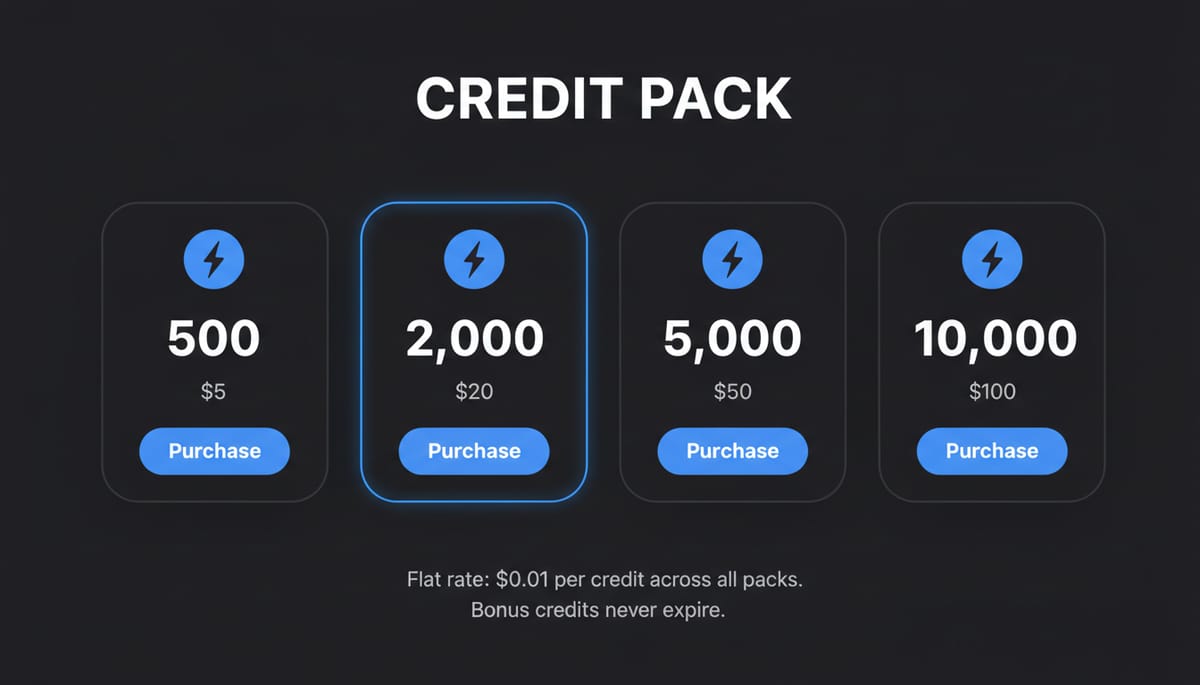
Credit Packs let you top up your balance with one-time purchases. They're only available to paid subscribers — free users can't buy them.
The pricing is consistent across all pack sizes:
| Pack | Price | Credits | Rate |
|---|---|---|---|
| Small | $5 | 500 | $0.01/credit |
| Medium | $20 | 2,000 | $0.01/credit |
| Large | $50 | 5,000 | $0.01/credit |
| XL | $100 | 10,000 | $0.01/credit |
There's no bulk discount in the pack pricing itself. But your subscription tier adds a bonus on top:
Standard: +10% → $100 pack = 11,000 credits
Pro: +30% → $100 pack = 13,000 credits
Premium / Ultra: +50% → $100 pack = 15,000 credits
Credits purchased through Credit Packs are Bonus Credits — they never expire. This changes the strategy: if you have a high-volume month coming up (a campaign, a product launch), buy a Credit Pack in advance. The credits will still be there when you need them.
Which Plan?
The right plan depends entirely on how often you generate and what quality you need. Here's a direct breakdown:
Hobbyist / just testing Use the free plan. Spend two weeks burning through the daily 60 credits and confirm the output quality fits your use case. Don't pay anything until you've tested with real prompts.
Occasional social creator (1–3 posts per week) Standard at $10/month works if 720P is acceptable for your platform. At base settings, 1,200 credits gets you around 26 videos. If you post to TikTok or Instagram Stories, 720P may be fine. If you're posting to YouTube or producing anything professional, it won't be.
Regular creator or freelancer Pro at $30/month is the first tier worth considering for professional use. You get 4K access, 30% off-peak savings, and 30% bonus on Credit Pack purchases. The jump from $10 to $30 triples your credits and removes the resolution ceiling.
Daily poster or small agency Premium at $60/month. The 50% off-peak discount and 50% Credit Pack bonus significantly reduce real per-video costs. At this usage level, those savings compound quickly.
High-volume teams Ultra at $199/month makes sense if off-peak generation fits your workflow — free off-peak generation can effectively double your output. Team Premium at $99/seat is better if you need shared credit pools, role management, and centralized billing across multiple creators.
Developer or API use PixVerse runs a completely separate pricing system for API access via platform.pixverse.ai. Plans start at $100/month (Essential, 15,000 credits) and scale to $6,000/month (Business, over 1 million credits). The credit-to-dollar rate is also different from the consumer app. If you're building a product on top of PixVerse generation, evaluate that system independently — the consumer plans don't apply.
Don't subscribe to Standard if you need 1080P or 4K output. That ceiling is fixed.
Hidden Costs
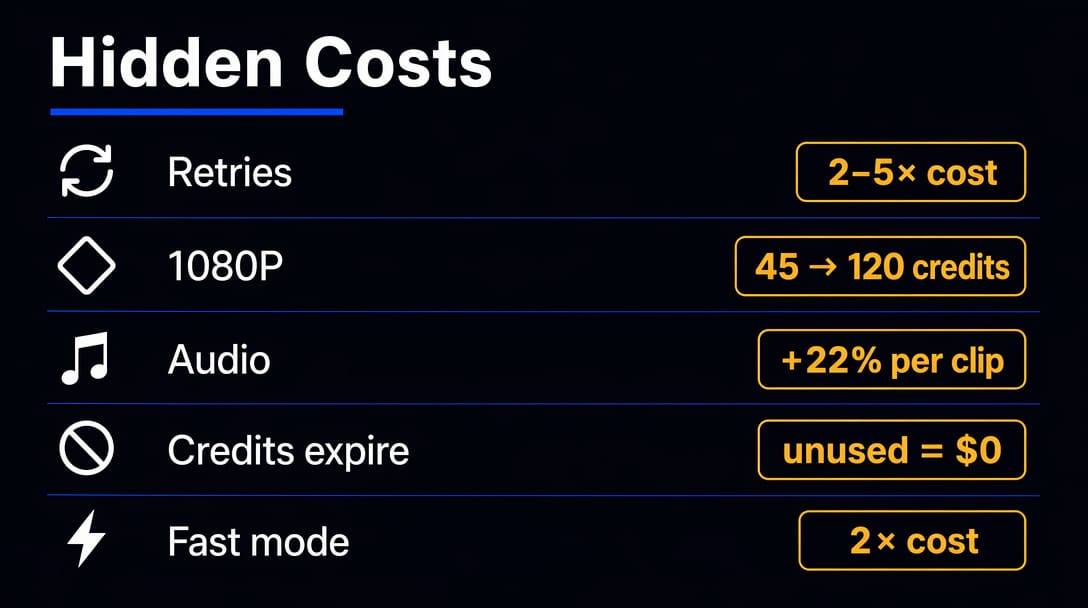
The plan price tells you what PixVerse charges. Your actual spend depends on how you generate. Here's the gap between the two:
Retry cost. PixVerse output is not deterministic — the same prompt can produce meaningfully different results across attempts. Most creators need 2–5 generations to get a usable clip. Your real cost per final video is 2–5× the base credit price.
Audio adds up. Adding audio to a V5.5 540P clip raises the cost from 45 to 55 credits — a 22% increase on every single video. At scale, that's significant.
Resolution multiplier. Moving from 540P to 1080P on V5.5 triples the credit cost (45 → 120). Creators who plan their budget at 540P rates and then generate at 1080P will hit limits much faster than expected.
Credits expire. Monthly Membership Credits disappear at the billing date. Unused credits in a slow month are simply lost. There's no credit banking across months unless you purchase a Credit Pack (those don't expire).
Fast motion mode costs double. On older models (V4.5 and earlier), selecting "fast" motion mode doubles the credit consumption. Easy to overlook when selecting generation settings.
vs Competitors
PixVerse sits in the affordable, fast end of the AI video market. Three comparisons matter most:
vs Runway: PixVerse is faster and cheaper for short clips. Runway has better camera control, longer output ceiling, and built-in editing tools. If you need to specify precise camera moves or produce clips longer than 10 seconds, Runway justifies the higher cost.
vs Kling AI: PixVerse renders faster. Kling produces noticeably more realistic human motion and physics — for character-driven or cinematic content, Kling is the stronger tool. For fast social content where style matters more than realism, PixVerse competes well. If you want to test both side by side, Somake runs both without separate accounts.
vs Pika: Price ranges are similar. Pika's interface has less friction and suits beginners better. PixVerse gives more control over models and generation modes for users who want to push further.
PixVerse is the right tool when speed and affordability matter most, and when 5–10 second social clips are the primary output format. Outside that scope, its competitors have real advantages.
Key Takeaways
Standard caps at 720P — upgrade to Pro if you need 1080P or 4K output.
Monthly credits expire at your billing date — unused credits don't roll over, so plan your usage.
Daily free credits reset every day — the free tier is genuinely useful for slow testing if you log in consistently.
Credit Pack purchases give you Bonus Credits that never expire — the best strategy for high-volume months.
Ultra's Off-Peak Mode offers 100% credit savings — free generation during quiet hours is the most underrated deal in the lineup.