Getimg AI Review 2026: Honest Look After 2.0
If you're searching "Getimg.ai review" right now, chances are you've seen the slick landing page, the impressive model lineup — and then hit a wall of mixed signals across the internet.
So what's the real story?
I spent the past few weeks putting Getimg AI through its paces — generating hundreds of images, testing Elements, stress-testing the credit system, and comparing results across every plan tier. This review is what I wish someone had written before I signed up.
By the time you finish reading, you'll know:
What Getimg.ai actually does well (and where it genuinely falls short) in April 2026
Whether the 2.0 rewrite was a smart evolution or a product disaster
How its pricing really works — and where your credits silently disappear
Who this tool is built for now, and who should walk away
No affiliate links. No sugarcoating. Let's get into it.
What Is Getimg.ai?
Getimg.ai is a browser-based AI image (and video) generation platform. You type a prompt, it produces visuals.
Simple concept. But the execution has gone through a dramatic shift.
The platform launched as a power-user playground — dozens of open-source models, custom LoRA training, granular parameter controls. It attracted a niche but loyal community of creators who loved tweaking every knob.
Then, in late 2025, the team shipped version 2.0.
The philosophy flipped: strip everything down. Remove the complexity. Let the AI pick the model. Make it feel like chatting with a creative assistant rather than piloting a cockpit.
That bet delighted some users. And infuriated others.
Let's unpack what actually changed.
2.0 Overhaul: New vs. Gone
What Getimg AI 2.0 Keeps

1. A Genuinely Clean Interface
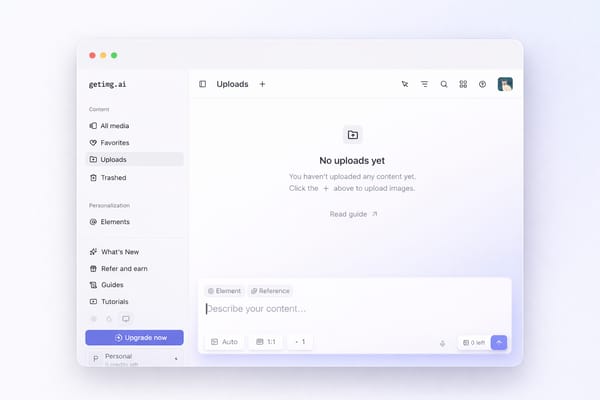
The new "Content Generator" is a single-page workspace. You type a prompt at the bottom. Results appear above. No separate tabs for txt2img, img2img, inpainting — it's all unified.
If you've ever felt overwhelmed by Automatic1111 or ComfyUI, this is the polar opposite. It's closer to a conversation than a control panel.
2. Auto Model Selection
This is the headline feature. You don't choose between FLUX.2, Nano Banana, or GPT Image 1.5. You describe what you want, and Getimg's routing system picks the best model and parameters automatically.
Think of it like Google Maps choosing the fastest route for you. You just type the destination.
3. Multi-Language Prompts
Write in English, Japanese, Spanish, Portuguese — the platform handles translation internally. A small detail, but a genuine accessibility win for non-English speakers.
4. A Curated Model Lineup
As of April 2026, the available models include:
FLUX.2 family (klein, max, flex, pro)
Seedream 4, 4.5, 5.0 Lite
GPT Image 1, 1.5
Gemini-powered Nano Banana 1, Pro, 2
Qwen Image
Z-Image Turbo
This is a solid, current roster. You're getting access to many of the best commercial and open models through one interface.
5. Elements — The LoRA Replacement
This deserves its own section (more below), but the short version: instead of training a custom model over hours, you upload reference images, name the "Element," and tag it in prompts with @ElementName.
6. Team Collaboration
Shared workspaces with role management, folder organization, and real-time syncing. More on this in the evaluation section below.
For agencies and small studios, this is a legitimate workflow feature — not a marketing checkbox.
What Getimg AI 2.0 Killed
Here's where the controversy lives.
1. Custom Model Training — Retired
As of March 1, 2026, the Model Trainer is officially gone. You can still use existing trained models, but you cannot create new ones. The replacement — Elements — is faster and easier, but it is not equivalent. We'll compare them in detail below.
2. Most Niche/Community Models — Removed
The old platform offered 80+ models. The new one offers roughly 15. The long tail of specialized, community-fine-tuned models is gone.
When I first logged into 2.0, my immediate reaction was: Where did everything go? If you relied on a specific anime checkpoint or a hyperrealistic portrait model that isn't in the curated list, it simply doesn't exist on the platform anymore.
3. Manual Parameter Control
No more choosing samplers, CFG scale, step counts, or schedulers. The AI handles everything.
For casual users, this is a feature. For technical users, it's a cage.
Elements vs. LoRA Training
Since this is the most contentious change, let's break it down directly.
| Old: Custom LoRA Training | New: Elements | |
|---|---|---|
| Setup Time | Hours to days | Minutes |
| Images Needed | 15-30+ curated images | Up to 20 images |
| Learning Curve | Steep (choose base model, set training params) | Near-zero (upload, name, use) |
| Consistency | Very high after good training | Good, but less controllable |
| Flexibility | Full fine-tuning of model weights | Reference-based guidance only |
| Types Supported | Anything the base model could learn | 13 categories: Person, Style, Product, Object, Place, Clothing, Pose, Sketch, Color Palette, Texture, Lighting, Composition, Animal |
| Use in Prompts | Select as model | Tag with @Name |
| Iterability | Retrain with new data | Re-upload, recreate |
The bottom line: Elements are dramatically more accessible. Creating one takes minutes, and the @Name syntax is intuitive. You can stack multiple Elements in a single prompt (@Me holding @MyCat in @CozyBedroom) — that's genuinely powerful.
But Elements are guidance, not fine-tuning. They tell the model "this is what I'm referring to." A trained LoRA told the model "this is who you are."
Who wins?
If you're a marketer creating product shots or social content → Elements are better. Faster, good enough, and way less friction.
If you're an artist who spent weeks training a specific aesthetic → the loss is real, and Elements won't fully replace what you had.
I want to be fair here: Getimg.ai is not the only platform making this trade. The industry is broadly moving toward simpler, reference-based workflows. But Getimg.ai made the switch abruptly, and the communication was poor. That's a valid criticism.
Pricing & Credit Breakdown
Here's the current pricing as of April 2026 (yearly billing, which saves 20%):
| Plan | Monthly Price | Credits/Month | Models | Concurrent Generations | Teams | Commercial Rights |
|---|---|---|---|---|---|---|
| Entry | $8 | 3,000 | 11 image / 9 video | 2 | ❌ | ✅ |
| Core | $25/seat | 15,000/seat | All | 4 | Up to 2 | ✅ |
| Plus | $55/seat | 35,000/seat | All | 8 | Up to 5 | ✅ |
| Ultra | $150/seat | 100,000/seat | All | 10 | Up to 10 | ✅ |
(Monthly billing is ~20% higher: $10, $30, $65, $175 respectively.)
At first glance, this looks reasonable. 3,000 credits for $8? That's a lot of images, right?

Not exactly. Let me put that into real numbers on the Entry plan:
3,000 credits per month
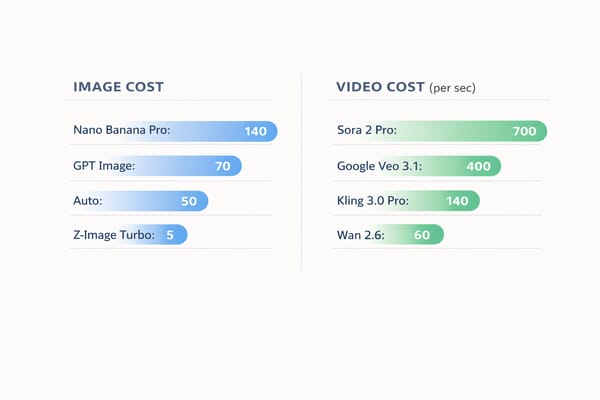
At ~650 credits per short video → roughly 4 short videos per month
At ~50-100 credits per image → around 30-60 images
The image math is decent. The video math is brutal.
Key insight: If you're primarily generating images, the Entry or Core plan can offer solid value. If you're experimenting with video, you'll blow through credits fast and likely need Plus or higher.
What About the Free Tier?
There isn't one. Not anymore.
This tripped me up when I first started researching. Many older reviews — some still ranking on the first page of Google — claim Getimg.ai offers 100 free credits per month. That information is outdated.
As of 2026, there is no free trial, no free credits, no way to test the platform without paying. You must subscribe to generate even a single image. I confirmed this myself: the signup flow leads directly to a payment wall with no bypass option.
This is a legitimate friction point. Competitors like Leonardo.ai and Somake AI still offer limited free tiers. Getimg.ai asks you to commit $8 minimum before you see a single result.
Is this a dealbreaker? Depends on your risk tolerance. But it's worth knowing before you sign up expecting to kick the tires for free.
One more thing worth flagging: as of this writing, Getimg.ai's landing page still uses phrases like "Free Image to Image AI Generator" in its page titles. If there's no free usage, that language is misleading — and it's the kind of mismatch that erodes trust before a user even signs up.
What It Does Well
Credit where it's due — the platform has genuine strengths that I came to appreciate during extended testing.
1. The Fastest Way to Access Top-Tier Models
For model access alone, Getimg.ai is one of the most comprehensive aggregators available. You're essentially paying for a unified API with a UI — and the UI is clean.
This also means the barrier to entry for non-technical users is near zero. No model selection, no parameter tuning, no prompt engineering jargon — just type what you want in your native language and get results. For teams where the person creating visuals is a social media manager or copywriter rather than an AI expert, that simplicity is the feature.
2. Elements Are Actually Great for Product/Brand Work
If you need to maintain visual consistency across a campaign — same product, same lighting style, same color palette — the Elements system is genuinely well-designed.
The 13 element types (Person, Product, Style, Lighting, Color Palette, etc.) cover real use cases. And the ability to stack multiple Elements in one prompt (@MyProduct with @BrandLighting on @MarbleTable) is powerful for commercial work.
I tested this by creating a "Person" Element with 8 photos and a "Lighting" Element from studio reference shots. The combination produced remarkably consistent results across dozens of generations — far less variance than I'd get from uploading a single reference image each time.
3. Team Workflows That Actually Work
The folder system, team sharing, role management, and the fact that generating inside a folder auto-saves to that folder — these are small touches that show the platform is thinking about production use, not just solo experimentation.
Most AI image tools treat collaboration as an afterthought. Getimg.ai has built it into the core architecture. You can create public or private teams, assign Admin or Creator roles, and every team member sees uploads and generations in real time.
What It Gets Wrong
1. The Model Training Retirement Was Handled Poorly
It's not just that they removed the feature. It's how they did it.
I went back and checked the official feedback channels. Community complaints about the 2.0 transition? Largely scrubbed. The transition timeline was abrupt. And from what I experienced firsthand, the credit costs for using legacy models on the old version crept upward — effectively pushing users to adopt the new system or leave.
Even if the product decision was correct (and simplification is a defensible strategy), the execution damaged trust. When a platform removes something users paid to create, the minimum expectation is transparent communication and a reasonable migration path. Getimg.ai fell short on both.
2. Video Generation Is Credit-Expensive
This isn't unique to Getimg.ai — video generation is computationally expensive everywhere. But when your cheapest plan gives you 3,000 credits and a single short video costs 650, the math doesn't work for video-focused users.
I burned through a week's worth of image-generation budget in two video attempts. If video is your primary use case, dedicated platforms like Runway or Kling may offer better value.
Who Should (and Shouldn't) Use It
After weeks of testing, here's my honest breakdown:
✅ Good Fit
Marketing teams who need consistent brand visuals across campaigns (Elements + Teams + Folders = real workflow)
Non-technical creators who want access to top-tier models without learning prompt engineering
Small agencies managing multiple client projects and needing organized collaboration
Product photographers exploring AI-generated product shots with consistent styling
❌ Not a Good Fit
Power users who want fine-grained control over models, samplers, and parameters
Artists who relied on custom-trained LoRA models for specific aesthetics
Budget-conscious experimenters who want to try before committing money
Video-first creators who need high volume output at reasonable cost
Competitive Comparison
I'm not going to do a shallow "getimg vs. everything" comparison — that's a separate article. But here's how I'd position it after testing:

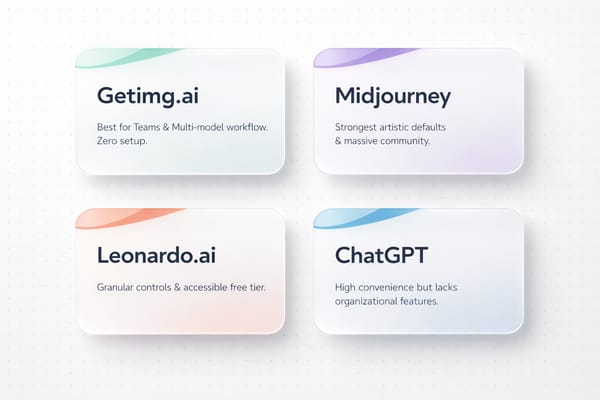
vs. Midjourney: Getimg.ai offers more model variety and team features; Midjourney has stronger artistic defaults and a massive community
vs. Leonardo.ai: Leonardo still offers a free tier and more granular controls; Getimg.ai has a cleaner UX and newer model access
vs. ChatGPT / Gemini image generation: The big chatbots are "free" with existing subscriptions but lack the organizational and workflow features Getimg.ai provides
vs. ComfyUI / local setups: Getimg.ai trades control for convenience — zero setup, but zero customization
Getimg.ai's real niche in 2026 isn't "best image quality" or "cheapest option." It's "best-organized multi-model platform for teams." That's where its unique value actually lives.
The Verdict
Here's the paradox of Getimg.ai in April 2026:
The product is objectively better for most new users. The interface is cleaner. The model roster is current. Elements are a smart, accessible feature. Team workflows are genuinely useful.
But the transition alienated the loyal early adopters. Removing custom model training without a real migration path, scrubbing community feedback, and quietly inflating legacy costs — these decisions created a trust deficit that still lingers.
If you're coming to Getimg.ai fresh, with no history on the platform, you'll likely find a polished, capable tool. The $8/month Entry plan is a reasonable starting point for image generation.
If you're a returning user who built workflows around the old system — the frustration is valid, and you'll need to decide if the new direction aligns with how you work.
5 Key Takeaways
Getimg.ai 2.0 is a full rebuild, not an update. The philosophy shifted from power-user control to AI-automated simplicity. This is a feature for some users and a dealbreaker for others.
Custom model training is dead. Elements are the replacement. They're faster and easier but less powerful. Good enough for brand consistency and product work; insufficient for fine-art-level customization.
There is no free tier. Don't believe older reviews. You pay from day one — minimum $8/month (yearly) or $10/month (monthly).
Credits disappear fast on video. The platform is cost-effective for image generation but punishingly expensive for video. Budget accordingly, or use a dedicated video tool.
The real value is in workflow, not raw generation. With Elements, Teams, Folders, and multi-model access in one UI, Getimg.ai's competitive advantage is organization and collaboration — not being the cheapest or highest-quality single generator.
FAQ
Last updated: April 2026. Pricing and features reflect the current state of Getimg.ai at time of publication.